
98% of spam filters check authentication records before they look at content.
Your subject line, your offer, your personalization: none of it matters if SPF, DKIM, or DMARC fails.
Yet 58% of domains with DMARC records don’t actually enforce them. That’s a problem hiding in plain sight.
I run TrulyInbox, a peer-to-peer email warm-up tool. I’ve analyzed authentication records across 32,000+ email accounts on our platform.
This blog combines that first-party data with the most credible deliverability.
All framed from a cold email sender’s perspective. Not an IT admin’s. Not a marketer’s.
Here’s what you’ll learn: how each record affects inbox placement, how the impact differs across ESPs, the most common misconfigurations, and what to do about them.
TL;DR: What the Data Shows
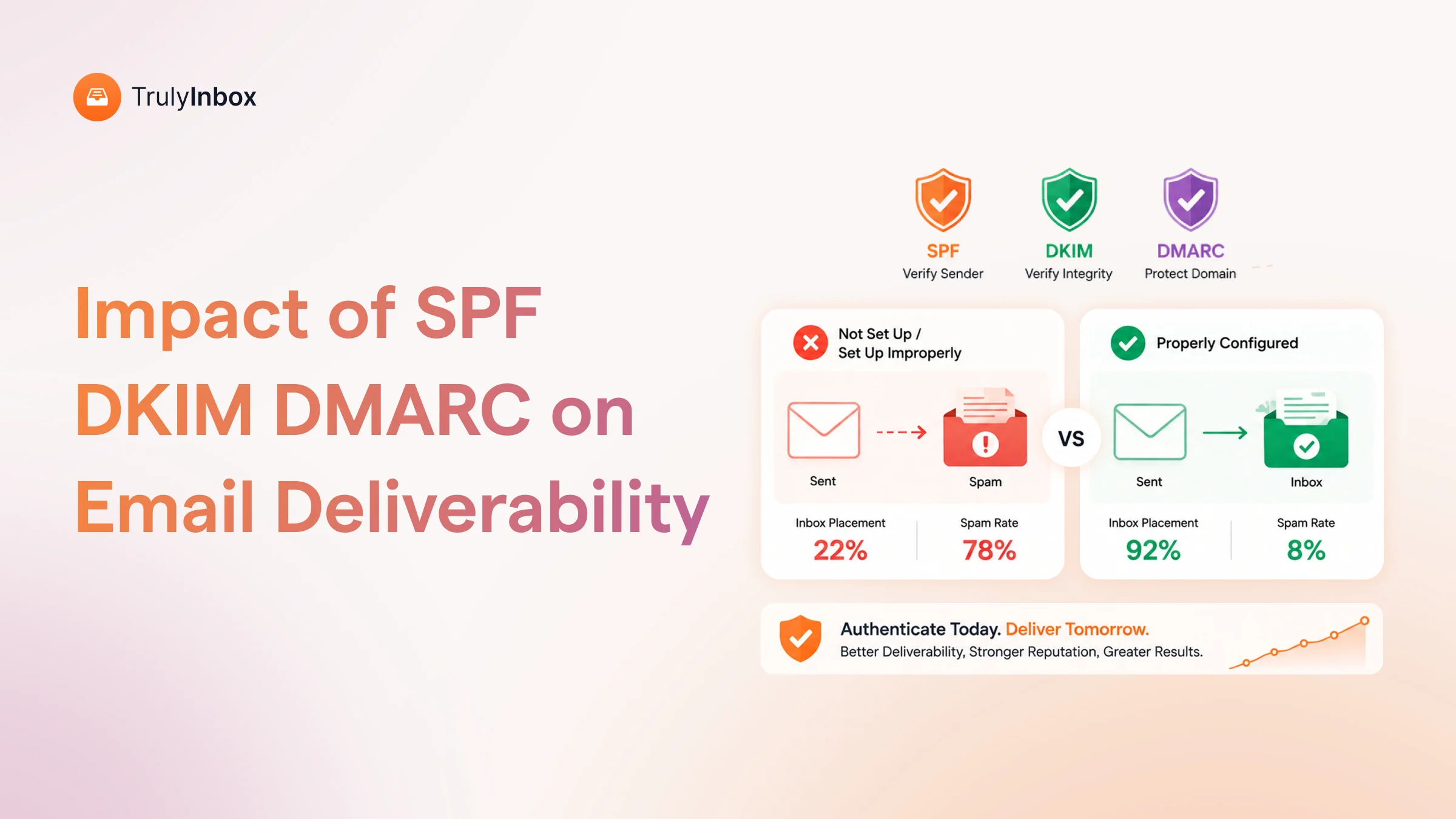
Fully authenticated domains (SPF + DKIM + DMARC enforced) achieve 2.7x higher inbox placement than unauthenticated domains.
The gap sits at roughly 85–95% versus sub-50%.
The enforcement gap is alarming. 78% of domains have a DMARC record. Only 42% enforce it.
That 36-point gap creates a false sense of security.
ESP behavior varies wildly. Microsoft is the harshest gatekeeper at 75.6% average inbox placement.
Office 365 dropped 26.7 percentage points in one year.
Google is more forgiving but still blocks unauthenticated bulk mail since February 2024.
Here’s what most cold emailers miss: DKIM is more commonly absent than DMARC. Its absence costs 10–15% lower inbox placement.
The bottom line is straightforward. All three records are non-negotiable in 2026.
A DMARC record set to p=none is barely better than no DMARC at all, especially for Microsoft-bound mail.
These findings are backed by authentication data from 32,000+ accounts on TrulyInbox, cross-referenced with industry benchmarks from Validity, Valimail, and Digital Bloom. Verified May 2026.
For a broader look at what drives deliverability beyond authentication, check out this email deliverability guide.
How Authentication Affects Inbox Placement (The Numbers)
Authentication isn’t a nice-to-have.
The data shows a measurable, steep drop in inbox placement when any record is missing or misconfigured.
Most blogs jump straight to “how to set up SPF.” This one leads with WHY.
Cold emailers don’t care about DNS syntax until they see the cost of getting it wrong.
Full Authentication vs None
Fully authenticated domains are 2.7x more likely to land in inboxes. They achieve 85–95% placement.
Without authentication, rates drop below 50%.
Google reported 265 billion fewer unauthenticated messages after enforcing authentication requirements.
In 2026, unauthenticated email is functionally undeliverable.
One missing record often performs worse than people expect.
The three records interact with each other, so a gap in one weakens the signal from the others.
What Each Record Does to Your Inbox Rate
Each authentication record serves a different function. Here’s how they individually affect your placement.
SPF
SPF (Sender Policy Framework) is the most basic check. Missing SPF is an instant red flag at most providers.
However, SPF misconfigurations affect 15% of SPF-enabled domains (dmarcian).
The most common breaker: exceeding the 10 DNS lookup limit defined in RFC 7208.
SPF alone gets you through the door. But it doesn’t prove message integrity.
DKIM
DKIM (DomainKeys Identified Mails) failure causes 10–15% lower inbox placement (InboxKit). That penalty is steeper than most senders realize.
DKIM is the record most commonly missing on cold email domains. Google Workspace doesn’t auto-enable it.
Users who set up SPF and DMARC but skip DKIM have a gap they often don’t know about.
DKIM also matters disproportionately for forwarded email:
- SPF breaks on forwarding. The forwarding server’s IP isn’t in the original SPF record.
- DKIM survives forwarding. It’s attached to the message itself, not the sending server.
DMARC
DMARC (Domain-based Message Authentication, Reporting, and Conformance) ties SPF and DKIM together. It tells receiving servers what to do when authentication fails.
The policy level matters enormously:
- p=none: monitoring only. Checks the compliance box. Zero protection. 63% of implementers still sit here.
- p=quarantine: failing messages go to spam. Mid-tier trust signal.
- p=reject: failing messages get blocked entirely. Strongest trust signal.
Organizations that enforce DMARC see a 3–10% improvement in inbox placement.
After May 2025, Microsoft began rejecting DMARC-failing mail from high-volume senders.
One SaaS startup reported their cold outreach pipeline “collapsed in 72 hours” after enforcement.
The Stacking Effect: Why All Three Together Beat Any One Alone
SPF alone gets partial trust. SPF + DKIM gets stronger trust. SPF + DKIM + DMARC at enforcement gets maximum trust.
DMARC alignment is the key.
DMARC checks that the From header domain matches the domain authenticated by SPF or DKIM.
You can pass both SPF and DKIM individually, but still fail DMARC if the domains don’t align.
Email accounts with full-stack authentication saw 20% faster warmup times and reached inbox placement of 91% on average.
For cold email, where you send to people who haven’t opted in, receiving servers scrutinize authentication more heavily.
Full authentication is the minimum bar.
| Authentication Setup | Inbox Placement Achieved During Warmup |
| Full (SPF+DKIM+DMARC enforced) | 85–95% |
| SPF+DKIM, DMARC at p=none | ~80–87% |
| SPF+DMARC, no DKIM | ~76–83% |
| SPF only | ~73-79% |
| No authentication | ~65-69% |
Ranges reflect variation across ESPs and sending patterns. Microsoft skews lower. Google skews higher.
Four ESPs Cold Emailers Use and How Authentication Differs on Each
Authentication behavior is not ESP-agnostic, even though every competitor blog treats it that way.
Setup complexity, defaults, failure modes, and inbox placement all differ by provider.
Cold emailers set up authentication on a specific ESP. This section maps authentication behavior to the four ESPs they actually use.
1. Google Workspace (74.5% of Cold Emailers)
Google Workspace dominates cold email. 74.5% of cold emailers use it (QuickMail data). It offers strong sender reputation and universal tool integration.
With proper configuration, inbox placement hits 94–98% (IceMail, Prospeo benchmarks).
When both Google and Microsoft are properly authenticated, performance is nearly identical: 94.18% vs 95.38% (Prospeo data).
But there’s a critical blind spot. Google auto-includes SPF via _spf.google.com. It does NOT auto-enable DKIM.
Enabling DKIM requires manual steps:
- Open Admin Console.
- Navigate to Apps > Gmail > Authenticate Email.
- Generate a DKIM key.
- Publish the TXT record to your DNS.
Many cold emailers skip this because SPF and DMARC “seem to work” without it. That’s a costly assumption.
Safe sending limits also matter. Experienced operators cap at 15–25 emails per day per inbox after the late-2025 crackdown.
The system cap is 2,000 per day, but that’s capacity, not permission.
Google and Yahoo enforced SPF, DKIM, and DMARC for bulk senders (5,000+ per day) since February 2024. Smart operators follow these standards at any volume.
Across 32,000+ accounts on TrulyInbox, Google Workspace domains with deliverability problems almost always trace back to one thing: DKIM not enabled in the Admin Console. Verified May 2026.
2. Microsoft 365 / Outlook (The Harsh Gatekeeper)
Microsoft 365 is the second most popular ESP for cold email, at roughly 20% of users. About 40% of B2B email addresses sit on Microsoft infrastructure (Statista/Puzzle Inbox).
If you sell B2B, a large chunk of your prospects use Outlook.
Microsoft is the harshest provider. Average inbox placement sits at 75.6%. Nearly 1 in 4 emails to Outlook or Hotmail lands in spam or goes missing (Validity 2025).
Office 365 dropped 26.7 percentage points year-over-year (Digital Bloom). That’s a massive decline.
In May 2025, Microsoft moved from routing non-compliant mail to junk to permanently rejecting it. Organizations without proper alignment saw email to Microsoft recipients “essentially disappear overnight” (Digital Bloom).
DKIM setup on Microsoft 365 is more complex than Google:
- Open the Defender portal.
- Navigate to Email Authentication Settings > DKIM.
- Retrieve two CNAME selector records.
- Publish them to DNS.
- Enable signing.
More steps mean more failure points. For a detailed walkthrough, follow this SPF, DKIM, DMARC setup guide.
There is one advantage. Microsoft 365 sending to Outlook recipients gets a 5–10% inbox placement advantage from same-platform delivery patterns (Puzzle Inbox 2026 data).
Microsoft domains struggle more in warm-up. When I dig into why, it’s almost always a DKIM alignment issue.
Microsoft uses CNAMEs that point to Microsoft’s DKIM hostnames, and the setup process has more steps where things break.
3. Zoho Mail (The Budget Pick That’s Fading)
Under 5.5% of cold emailers use Zoho Mail (QuickMail data). It started as a budget rotation inbox alongside Google Workspace.
In early 2023, Zoho was popular for multi-account hosting at low cost. By late 2023, nobody recommends it as a primary sender.
Zoho provides SPF, DKIM, and DMARC setup. Authentication isn’t the issue here.
Platform tolerance is. Even perfectly authenticated Zoho domains risk suspension if Zoho detects outbound cold email patterns.
Its current role is limited to backup and rotation inboxes only. Some operators run Google Workspace as primary and Zoho as secondary, cutting infrastructure costs by 60–70%.
4. Custom SMTP / Infrastructure Providers (Mailforge, Maildoso, etc.)
Custom SMTP is a growing segment. Platforms like Mailforge, Maildoso, and Hypertide provide bulk mailbox provisioning on privately controlled SMTP servers or dedicated IP pools.
Authentication is typically auto-configured by these providers. SPF, DKIM, and DMARC come included at setup.
However, a trust gap exists. Even with perfect authentication, custom SMTP lacks the native trust ecosystem of Google or Microsoft.
Receiving servers evaluate unfamiliar infrastructure more conservatively. IP reputation becomes the primary filtering variable.
The right way to think about it: identical authentication records on Google Workspace versus custom SMTP don’t produce identical inbox placement. Authentication gets you through the door. The ESP’s reputation determines which room you enter.
Custom SMTP can work. But it usually requires:
- More aggressive warm-up to build IP and domain reputation.
- Tighter sending patterns to avoid triggering spam traps.
- Higher list quality to compensate for lower baseline trust.
I’ve seen this across 32,000+ accounts in TrulyInbox warm-up data. Domains with identical authentication records, same SPF, same DKIM strength, same DMARC policy, but the Google Workspace domain consistently outperforms the custom SMTP domain. Verified May 2026.
The Most Common Authentication Mistakes on Cold Email Domains
Authentication failures on cold email domains follow predictable patterns. Every competitor blog explains how to set up records. None show what’s commonly broken on live domains.
This section draws from patterns observed across 32,000+ accounts on TrulyInbox and publicly reported failure data.
1. DKIM Not Enabled on Google Workspace
This is the single most common mistake. Google Workspace auto-includes SPF. It does NOT auto-enable DKIM.
Many cold emailers set up SPF and DMARC, see “things are working,” and never realize DKIM is missing.
Their DMARC passes because SPF aligns. But they’re missing the DKIM trust signal entirely.
How to check: Open Admin Console > Apps > Gmail > Authenticate Email. If it says “Status: Not authenticated,” DKIM isn’t signing your emails.
The cost is real. You lose 10–15% inbox placement. On a 50-email-per-day cold campaign, that’s 5–7 emails per day going to spam unnecessarily.
2. SPF Record Exceeding the 10-Lookup Limit
Every include, a, mx, ptr, exists, or redirect counts toward a 10-lookup limit (RFC 7208). Exceeding it returns a PermError. SPF fails silently.
Cold emailers are uniquely vulnerable to this problem. A typical stack includes:
- Google Workspace (1 include)
- A warm-up tool (1 include)
- A cold email platform (1 include)
- Possibly a CRM that sends email (1 more)
Each tool’s include can nest additional lookups underneath. 15% of SPF-enabled domains have misconfigurations (dmarcian). The 10-lookup limit is the most common cause.
To fix it, audit with MXToolbox. Remove unused includes. Consolidate senders. Use subdomains for heavy senders.
3. DMARC Stuck at p=none Permanently
Starting with p=none is correct during monitoring. Leaving it there forever is a mistake 63% of DMARC implementers make.
p=none tells receiving servers: “I have DMARC, but don’t act on failures.” It checks the compliance box but sends a weaker trust signal.
The intended rollout path looks like this:
- p=none for 2–4 weeks (monitor and fix issues).
- p=quarantine for 2–3 weeks (failing mail goes to spam).
- p=reject (failing mail gets blocked entirely).
Most cold emailers set p=none during warm-up and never progress. After Microsoft’s May 2025 enforcement, this creates real deliverability risk for Outlook-bound mail.
4. Alignment Failures (SPF Passes, DKIM Passes, DMARC Still Fails)
This is the most confusing failure mode. SPF passes. DKIM passes. DMARC fails anyway.
DMARC requires alignment: the domain in the From header must match the domain authenticated by SPF or DKIM. Relaxed alignment allows subdomains. Strict alignment requires an exact match.
The common trigger is using a cold email tool that sends via its own servers:
- SPF passes for the tool’s domain, not yours.
- DKIM signs with the tool’s domain, not yours.
- Both pass individually, but neither aligns with YOUR From domain.
To fix this, ensure DKIM signs with your sending domain. Ensure SPF includes the servers that actually send your email. Check alignment in Gmail’s “Show Original” view.
5. Using 1024-bit DKIM Keys on Older Setups
Google defaults to 2048-bit DKIM keys. But older configurations or non-Google setups may still use 1024-bit.
2048-bit is the recommended standard. Google’s own documentation recommends it.
If your DNS provider has character limits on TXT records, split the DKIM key into two strings within the same record. A quick check: 2048-bit keys are roughly 400+ characters long. If yours is significantly shorter, you’re likely on 1024-bit.
Authentication Alone Isn’t Enough: What Else Moves the Needle
Authentication is necessary but not sufficient. DNS records alone won’t guarantee inbox placement. Four other factors determine where your emails land after authentication passes.
Domain Age and Reputation
New domains achieve roughly 55% inbox placement. Mature domains hit 85%. That’s a 30 percentage point premium (Digital Bloom).
Authentication on a brand-new domain won’t get you 90%+ placement. ISPs need time plus consistent sending history to build trust.
The combination that works: authentication + warm-up + time. Together, they build reputation that authentication alone can’t create. For a step-by-step approach, check out this email warm-up guide.
Warm-Up: The Layer Authentication Can’t Replace
Authentication proves your identity. Warm-up builds your history. They solve different problems, and you need both.
Peer-to-peer warm-up (like TrulyInbox) creates real engagement signals. Opens, replies, and spam-to-inbox moves train ISPs to trust your sending patterns.
The interplay works in both directions:
- Without authentication, warm-up emails land in spam before engagement happens.
- Without warm-up, authenticated emails have no history behind them.
The performance gap is significant. Campaigns with inbox placement above 90% average 5.3% reply rates. Below 70%, they average 0.8% (Smartlead platform data).
This is what I built TrulyInbox to solve. Authentication is the foundation. Warm-up is the construction on top of it.
List Quality and Bounce Rates
Bounce rates above 2% damage sender reputation regardless of authentication. Above 5%, most ESPs throttle or suspend your account.
Authentication doesn’t protect you from bad data. Sending authenticated emails to invalid addresses still tanks your reputation.
The order matters: verify lists first, authenticate domains, warm up, then send. For reliable verification options, explore these email verification tools.
Content and Engagement Signals
Gmail and Microsoft increasingly weight engagement quality.
Time spent reading, reply depth, and conversation length all influence placement.
Authentication determines delivery. Content determines folder placement.
Gmail separates security verification (authentication) from content categorization (promotional signals). Perfect authentication doesn’t prevent the Promotions tab. It only ensures your email arrives.
What happens after arrival depends on what you wrote and how recipients interact with it.
How to Audit Your Authentication in Under 10 Minutes
You can check all five authentication components in a single sitting. Here’s how to do it, step by step.
Step 1: Check SPF
- Use MXToolbox SPF Lookup or run dig TXT yourdomain.com.
- Verify three things: the record exists, the lookup count is 10 or fewer, and the correct include statements cover your ESP plus sending tools.
- Red flag: A “Too many DNS lookups” error means your SPF is broken.
Step 2: Check DKIM
- Send a test email to a Gmail account. Open it, click the three dots, and select “Show Original.”
- Look for DKIM: PASS with your domain name (not your tool’s domain).
- If it says DKIM: NONE or DKIM: FAIL, your DKIM isn’t configured or isn’t aligned.
- Google Workspace users: Admin Console > Apps > Gmail > Authenticate Email > check status.
Step 3: Check DMARC
- Look up the _dmarc.yourdomain.com TXT record.
- Verify three things: the record exists, the policy is at least p=quarantine (not stuck at p=none), and the rua tag points to an email you actually monitor.
- If your policy is p=none and you’ve been sending for more than 4 weeks, move to p=quarantine.
Step 4: Check Alignment
- In the Gmail “Show Original” view, confirm the DKIM signing domain and SPF authorized domain match your From domain.
- If SPF passes for sendgrid.net but your From is @yourdomain.com, you have an alignment problem.
Step 5: Monitor with Google Postmaster Tools
- It’s free. It shows authentication pass rates, spam rate, and domain reputation.
- If you send 100+ daily emails to Gmail recipients, this is non-negotiable.
- Keep spam complaint rate below 0.10%. The red line is 0.30%.
Use TrulyInbox’s free DMARC generator to create a properly formatted record if you need one.
I’ve run this check across 32,000+ accounts connecting to TrulyInbox. It takes 10 minutes and catches the five issues listed above. Verified May 2026.
FAQs About Email Authentication and Inbox Placement
1. Does Email Authentication Guarantee Inbox Placement?
No. Authentication is a prerequisite, not a guarantee. Fully authenticated domains achieve 85–95% inbox placement.
But domain reputation, sending patterns, list quality, and content all influence the final folder. Authentication gets you past the first filter. Everything else determines where you land.
2. Which Authentication Record Matters Most for Cold Email?
All three are required in 2026. If forced to prioritize setup order: DKIM first (most commonly missed, hardest to spoof), SPF second (most basic check), DMARC third (ties them together).
Running without all three is running with a measurable deliverability handicap.
3. Does DMARC Policy Level Affect Inbox Placement?
Yes. p=none passes compliance checks but sends a weaker trust signal. Microsoft started rejecting DMARC-failing mail in May 2025.
Moving to p=quarantine or p=reject correlates with higher inbox placement and stronger domain reputation. Don’t stay at p=none longer than 4 weeks.
4. How Long After Fixing Authentication Does Inbox Placement Improve?
DNS changes propagate within 1–48 hours. But reputation impact takes longer.
Typically, you’ll see 2–4 weeks of consistent, authenticated sending before inbox placement stabilizes at a new level. Pairing authentication fixes with a warm-up tool accelerates the recovery.
5. Can I Use the Same SPF Record for My ESP and Cold Email Tool?
Yes, but watch the 10-lookup limit. Each include statement counts toward 10 total DNS lookups.
Using Google Workspace + a warm-up tool + a cold email platform can push you close. Audit with MXToolbox. If you’re over 10, consolidate or use subdomains.
6. Is Authentication Different for Cold Email vs Email Marketing?
The DNS records are identical. The stakes are different.
Cold emailers send to people who haven’t opted in, so receiving servers scrutinize authentication more heavily. Marketing emails to opted-in lists get more leeway. For cold email, enforcement-level DMARC (p=reject) is strongly recommended.
7. Does Warm-Up Help if Authentication Is Broken?
Minimally. Warm-up builds engagement signals like opens and replies.
But if authentication fails, many warm-up emails land in spam or get rejected before engagement happens. Fix authentication first, then warm up. The order matters.
 Yash Jain