 Vatsal Shah
 Both TrulyInbox and Warmforge show up when you search for an email warm-up tool.
But here’s what most people miss until they’re deep into pricing pages:
These two tools run on fundamentally different pricing models.
- TrulyInbox charges based on the volume of warm-up emails.
- Warmforge charges per mailbox slot.
That single difference dramatically changes what you pay at scale.
In this blog, I have compared TrulyInbox and Warmforge to give you an honest, data-backed verdict.
Here’s what I cover:
- Real cost math at 10, 20, 50, 60, 100, and 150 inboxes
- Feature-by-feature breakdown on what actually matters for warm-up
- ESP compatibility differences that could be a hard blocker for your setup
- Clear recommendations for who should pick which tool
Quick disclosure: I work with TrulyInbox. You should factor that in. But this comparison uses real pricing from both websites, actual feature checks, and honest trade-offs. Including where Warmforge wins.
TrulyInbox Vs Warmforge – TOC
- TL;DR – TrulyInbox Vs Warmforge Quick Verdict
- The Core Difference Between TrulyInbox and Warmforge That Most Comparisons Miss
- TrulyInbox Vs Warmforge Pricing Breakdown: What It Actually Costs at Scale
- TrulyInbox Vs Warmforge Feature-by-Feature Comparison
- Where Warmforge Wins and Who It’s Ideal For
- Where TrulyInbox Wins and Who It’s Ideal For
- FAQs About TrulyInbox Vs Warmforge
TL;DR: TrulyInbox Vs Warmforge Quick Verdict
Here is the short 60-second version of the entire blog.
TrulyInbox is the better pick for most cold email teams running 10+ inboxes. The reason is simple: volume-based pricing and broad ESP support.
Warmforge is the better pick if you’re already inside the Salesforge ecosystem and need built-in inbox placement testing.
The three differences that matter most:
- Pricing model: TrulyInbox uses volume-based pricing (pay for warm-up capacity, not per inbox). Warmforge charges per mailbox slot (cost scales linearly with every inbox you add).
- ESP support: TrulyInbox works with any SMTP provider. Warmforge only supports Google Workspace, Microsoft 365, and Primeforge/Mailforge IMAP.
- Feature scope: Warmforge includes built-in inbox placement testing (TrulyInbox doesn’t have this yet). TrulyInbox focuses purely on warm-up with broader compatibility.
The cost gap at scale:
- At 20 inboxes: TrulyInbox costs $79/month vs Warmforge’s $220/month
- At 50 inboxes: TrulyInbox costs $79/month vs Warmforge’s $550/month
| Factor | TrulyInbox | Warmforge | Winner | Why It Matters |
|---|---|---|---|---|
| Pricing Model | Daily Warmup Volume-based | Per-slot (Inbox) | TrulyInbox | Predictable costs at scale |
| Free Plan | Yes (forever) | Yes (1 slot) | Tie | Test before committing |
| ESP Support | Google Workspace, Microsoft O365 or any SMTP(supports 18+ providers) | Google Workspace, Microsoft O365 or SMTP accounts from Primeforge/Mailforge | TrulyInbox | Hard blocker |
| Placement Testing | Not available | Built-in (1 free test/month) | Warmforge | Know if emails land in inbox vs spam |
| Health Monitoring | DNS/MX checks + blacklist | DNS/MX checks + blacklist | Tie | Both cover the essentials |
| Cost at 10 Inboxes | $29/month | $120/month | TrulyInbox | 4x more affordable |
| Cost at 20 Inboxes | $79/month | $220/month | TrulyInbox | 2.8x more affordable |
| Cost at 50 Inboxes | $79/month | $550/month | TrulyInbox | 7x more affordable |
BiasNote: I work with TrulyInbox, but the pricing math doesn’t change based on who’s writing.
Below, I break down the actual cost at 10, 20, 50, and 100 inboxes, compare features head-to-head, and explain when Warmforge is genuinely the right choice.
The Core Difference Between TrulyInbox and Warmforge That Most Comparisons Miss
Most comparison blogs list features side by side and call it a day.
They miss the two structural differences that actually affect your decision:
How each tool charges you and which email providers it supports.
- Volume-Based Vs Per-Slot Pricing
- The ESP Compatibility Gap
- Why These Differences Matter for Your Cold Email Setup
Volume-Based Vs Per-Slot Pricing
This is the single biggest difference between TrulyInbox and Warmforge. It affects what you pay at every scale point.
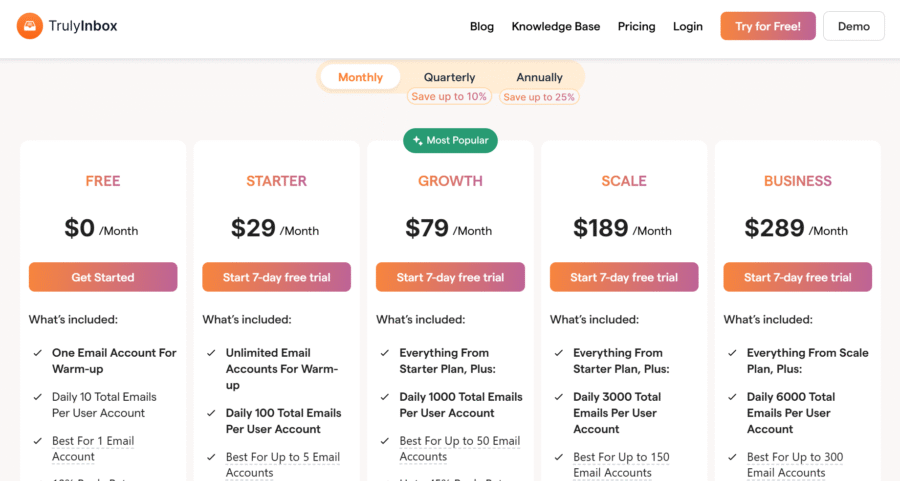
TrulyInbox: Volume-based pricing
TrulyInbox charges for warm-up email volume, not per inbox.
You pick a plan based on how many daily warm-up emails you need, then connect as many inboxes as that volume supports.
All paid plans include unlimited inbox connections
Think of it this way: you’re buying warm-up capacity, not inbox seats
Add more inboxes without paying more, as long as your total daily warm-up volume stays within your plan.
Warmforge: Per-slot pricing
Warmforge charges per mailbox slot.
The price per slot drops slightly at higher volumes, but total cost scales linearly with every inbox you add.
The difference becomes obvious when you scale.
At just 10 inboxes, the gap becomes too huge.
I’ll show the exact math in the pricing section below.
The ESP Compatibility Gap
This is the second structural difference, and it’s a potential dealbreaker that no other comparison mentions.
Warmforge supports:
- Google Workspace
- Microsoft Office 365
- IMAP/SMTP from Primeforge/Mailforge infrastructure
TrulyInbox supports:
- Google Workspace and Microsoft 0365
- Multiple providers like Zoho, SendGrid, Brevo, etc., through SMTP (18+ providers supported)
This is a hard blocker.
If you’re using any provider outside Google/Microsoft/Primeforge, Warmforge simply won’t work for you.
TrulyInbox’s broad SMTP support means it works with virtually any email provider you choose.
Why These Differences Matter for Your Cold Email Setup
Let’s make this concrete.
Here’s what these two differences mean for your day-to-day:
- Warm-up volume-based pricing = predictable costs as you scale. No surprise jumps when you add inbox #51.
- Per-slot pricing = costs multiply with every inbox. Budget planning gets harder as you grow.
- Broad ESP support = freedom to choose your email infrastructure based on what works best.
- Restricted ESP support = potential infrastructure lock-in before you even start warming up.
These aren’t minor differences.
They shape your entire warm-up budget and infrastructure decisions. Now let’s look at the full pricing breakdown.
TrulyInbox Vs Warmforge Pricing Breakdown: What It Actually Costs at Scale
Most comparisons list plan names and move on. That’s useless.
What you need is the actual cost at the scale you’re operating at, or planning to reach.
Below is the full pricing for both tools, followed by a head-to-head cost table at common scale points.
TrulyInbox Pricing
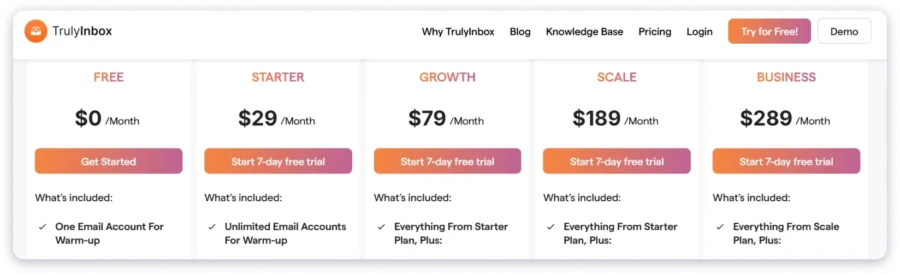
TrulyInbox offers 4 paid plans plus a free forever plan.
Remember: all paid plans include unlimited inbox connections.
You’re paying for warm-up email capacity, not seats.
- Free Forever: Limited daily warm-up emails, 1 inbox. Good for testing the tool before committing.
- Starter ($29/month): 100 warm-up emails/day.
- Growth ($79/month): 1,000 warm-up emails/day. This is where most scaling teams land.
- Scale ($189/month): 3,000 warm-up emails/day. Built agencies and high-volume teams.
- Business ($289/month): 6,000 warm-up emails/day. Built for large agencies and enterprises managing multiple domains.
Warmforge Pricing
Warmforge uses per-slot pricing.
The cost per slot decreases slightly at higher volumes, but total spend scales linearly.
- 10 slots: $12/slot = $120/month
- 20 slots: $11/slot = $220/month
- 60 slots: $10/slot = $600/month
- 100 slots: $10/slot = $1,000/month
- 110 slots: $9/slot = $990/month
Included at all tiers:
- Automated AI warm-up
- 1 free inbox placement test per month
- DNS & MX health checks
- Blacklist monitoring
Cost Comparison at Scale (The Math That Matters)
Here’s the table that no other comparison gives you.
Real costs at the inbox count cold email teams actually operate at.
Per-inbox cost breakdown:
- At 50 inboxes: TrulyInbox = $1.58/inbox. Warmforge = ~$10/inbox.
- At 150 inboxes: TrulyInbox = $1.26/inbox. Warmforge = ~$9/inbox.
It’s quite evident that TrulyInbox is significantly cost-efficient at every scale, and the gap widens as you add more inboxes.
TrulyInbox Vs Warmforge Feature-by-Feature Comparison
Pricing aside, you need to know what each tool actually does.
This section covers the features that matter for warm-up tool selection. No filler categories.
- Warm-Up Approach
- Inbox Placement Testing
- Domain Health & Blacklist Monitoring
- Reporting & Analytics
- Integrations & Ecosystem
Warm-Up Approach
Both tools automate inbox warm-up. The core mechanism is similar, but the implementation differs.
TrulyInbox:
- Uses a peer-to-peer network of real inboxes
- Automated engagement patterns (opens, replies, spam folder rescue)
- Daily volume controls to customize warm-up speed
Warmforge:
- Uses “Automated AI email warm up” (their language)
- AI-driven engagement patterns
- Warm-up activity included at all pricing tiers
Verdict: Similar core mechanism, different networks. Without controlled testing data comparing deliverability outcomes, it’s hard to declare a winner here.
The real differences between these tools are pricing and ESP support, not warm-up methodology.
Inbox Placement Testing
This is Warmforge’s clearest feature advantage. Full stop.
Inbox placement testing tells you whether your emails are actually landing in inbox, spam, or promotions across different providers.
It’s different from warm-up. Warm-up builds reputation. Placement testing measures where your emails end up.
Warmforge:
- 1 free placement test per month included with all warm-up plans
- Dedicated Placement Testing plans available:
- Pro: $39/month for 100 tests
- Growth: $169/month for unlimited tests
TrulyInbox:
- Does not currently offer inbox placement testing
- The feature is in the pipeline, but not live yet
Verdict: Warmforge wins this category. No spin needed.
If placement testing is critical to your workflow right now, Warmforge has it and TrulyInbox doesn’t.
Domain Health & Blacklist Monitoring
Keeping tabs on your domain’s health is non-negotiable when running cold email at scale.
Warmforge:
- Built-in DNS & MX record validation
- Blacklist monitoring with alerts
- Bundled into all pricing tiers
TrulyInbox:
- Built-in DNS & MX record validation
- Blacklist monitoring
Verdict: Both TrulyInbox and Warmforge offer DNS/MX validation and blacklist monitoring as standard features.
This one’s a tie. The basics are covered on both sides.
Reporting & Analytics
Both tools provide dashboards to track warm-up performance. The depth varies.
Warmforge:
- Real-time deliverability dashboard
- Warm-up metrics integrated with placement testing data
- Visibility into DNS and blacklist status alongside warm-up progress
TrulyInbox:
- Graphical dashboard with delivery tracking
- Visibility into warm-up volume, engagement rates, and inbox health
Verdict: Warmforge’s reporting is more comprehensive because it combines warm-up data with placement testing and domain health in one view.
TrulyInbox’s reporting covers the warm-up but doesn’t have the placement testing layer. For most teams, warm-up metrics alone are sufficient.
If you want a single pane of glass for everything, Warmforge has the edge.
Integrations & Ecosystem
Both tools connect to larger cold email ecosystems. This matters if you’re already committed to one.
Warmforge:
- Part of the Salesforge ecosystem
- Free warm-up included with Salesforge subscription
- Designed to integrate tightly with Salesforge’s outreach tools
TrulyInbox:
- Partners with Saleshandy to provide warm-up for Saleshandy users
- Free warm-up included with Saleshandy subscription
- Integrates with the Saleshandy cold email stack through this partnership
Verdict: This is a tie. It depends entirely on which outreach platform you use.
If you’re on Salesforge, Warmforge is the natural fit (and free).
If you’re on Saleshandy, TrulyInbox is the natural fit (and free).
Neither tool wins on standalone integrations.
Note: This blog focuses on TrulyInbox and Warmforge as standalone warm-up tools, not as part of their parent platforms or partnerships.
Where Warmforge Wins and Who It’s Ideal For
Here’s where Warmforge is genuinely the better choice. No faint praise.
Warmforge’s real advantages:
- Built-in inbox placement testing. TrulyInbox doesn’t have this. If knowing exactly where your emails land (inbox vs spam vs promotions) is critical to your workflow, Warmforge delivers it natively.
- Free warm-up with Salesforge subscription. If you’re already paying for Salesforge, warm-up costs you nothing extra. That’s a genuine ecosystem advantage.
- Dedicated placement testing plans. For teams that need high-volume placement testing (100+ tests/month), Warmforge has purpose-built plans.
Who should pick Warmforge:
- You’re already using Salesforge for outreach. Warm-up comes free. No reason to pay separately.
- You need built-in inbox placement testing and don’t want to manage a separate tool for it.
- You’re exclusively on Google Workspace or Microsoft 365 and value bundled diagnostics in your warm-up tool.
Where TrulyInbox Wins and Who It’s Ideal For
TrulyInbox’s advantages are rooted in two things:
Cost-effectiveness at scale and infrastructure flexibility.
Here’s where it clearly wins.
TrulyInbox’s real advantages:
- 3-7x cheaper at scale. At 20 inboxes: $79 vs $220. At 50 inboxes: $79 vs ~$500. At 100 inboxes: $189 vs $1,000. This isn’t opinion. It’s verified pricing math.
- Broad ESP support. Works with any SMTP provider. Google Workspace, Microsoft 365, Zoho, custom SMTP, you name it. No infrastructure lock-in.
- Volume-based pricing. Predictable costs. No per-inbox multiplication. Your budget doesn’t spike every time you add an inbox.
- Free forever plan. Test the tool, understand how it works, and decide if it fits your setup before spending a dollar.
- Unlimited inbox connections on paid plans. No artificial slot limits. Connect as many inboxes as your warm-up volume supports.
Who should pick TrulyInbox:
- You’re scaling beyond 10 inboxes and cost matters. The Growth plan covers 20-50 inboxes for $79/month. That’s where the value becomes undeniable.
- You use email providers beyond Google Workspace/Microsoft 365. Zoho, custom SMTP, or a mix of providers? TrulyInbox is your only option between these two.
- You’re already using Saleshandy. Warm-up comes free with your subscription. Same ecosystem advantage Warmforge has with Salesforge.
- You want to start free and test before paying. The free forever plan lets you evaluate the tool with zero risk.
FAQs About TrulyInbox Vs Warmforge
1. Is TrulyInbox better than Warmforge?
For most cold email teams running 10+ inboxes, yes. Primarily because of pricing.
TrulyInbox is 3-7x cheaper at scale and supports more email providers.
But if you need built-in placement testing or you’re already on Salesforge, Warmforge may be the better fit for your specific setup.
2. Does TrulyInbox offer inbox placement testing?
Not currently. It’s in the development pipeline but not live yet.
If you need placement testing now, you can use standalone tools like GlockApps or Mail-Tester alongside TrulyInbox, or choose Warmforge which includes it natively.
3. What’s the difference between volume-based and per-slot pricing?
Volume-based pricing (TrulyInbox) charges for total warm-up email capacity.
Add more inboxes without extra cost as long as you stay within your plan’s daily volume.
Per-slot pricing (Warmforge) charges for each connected inbox. Every new inbox increases your bill.
4. Can I use Warmforge with Zoho or custom SMTP?
No. Warmforge currently supports Google Workspace, Microsoft Office 365, and IMAP/SMTP from Primeforge/Mailforge only.
If you need broader ESP support, TrulyInbox works with any SMTP provider, including Zoho and custom setups.