
 Vatsal Shah
 If you are checking email deliverability issues, MXToolbox is probably one of the first tools you have come across.
It is widely used for quick email health checks.
Domains. IPs. DNS records. Blacklists.
But here is the real question.
Does MXToolbox actually solve deliverability problems, or does it only tell you what is broken?
In this MXToolbox review, I will break it down simply.
- What it does well.
- Where it struggles.
- And who it truly makes sense for.
MXToolbox Review TOC
TL;DR MXToolbox Review
MXToolbox is a solid diagnostic tool for checking email infrastructure issues.
It helps you spot problems fast.
Blacklists. DNS. Authentication gaps.
It does not fix deliverability issues or improve inbox placement on its own.
Use MXToolbox if you need visibility and verification. Do not rely on it as a complete deliverability solution.
Best as a supporting tool. Not a standalone fix.
What Is MXToolbox?
MXToolbox is an email diagnostic tool used to check the technical health of your sending setup.
It helps you spot problems fast. You can use it to
- Check if your domain or IP is blacklisted
- Verify SPF, DKIM, and DMARC records
- Test SMTP responses and server issues
- Monitor basic email reputation signals
Who Should Use MXToolbox?
MXToolbox works best for people who already understand email infrastructure.
It is useful when you want quick answers. It is less helpful if you want guided recovery.
Best suited for
- Deliverability consultants
- System admins managing domains
- Technical marketers troubleshooting issues
You may struggle with MXToolbox if
- You want automated fixes
- You expect step by step recovery help
- You are new to email deliverability
Real User Reviews and Feedback?
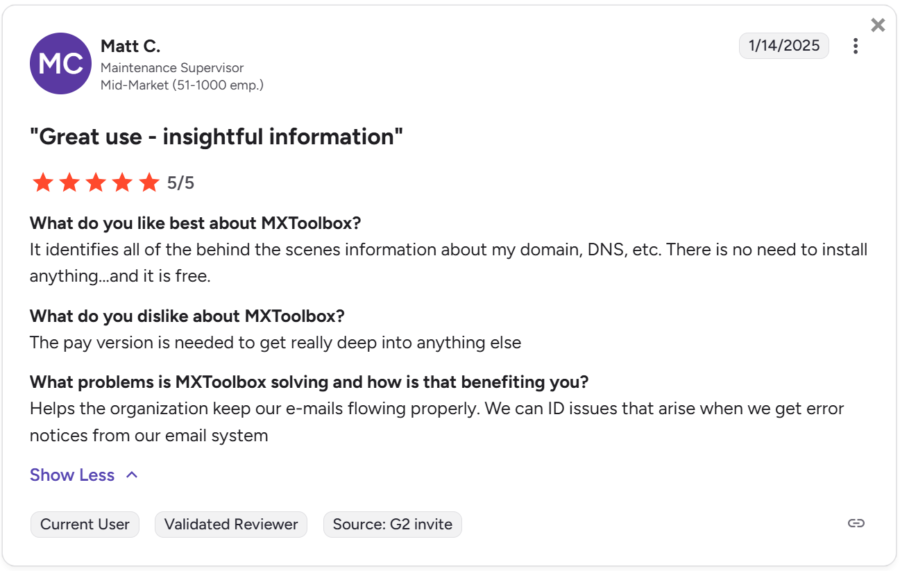
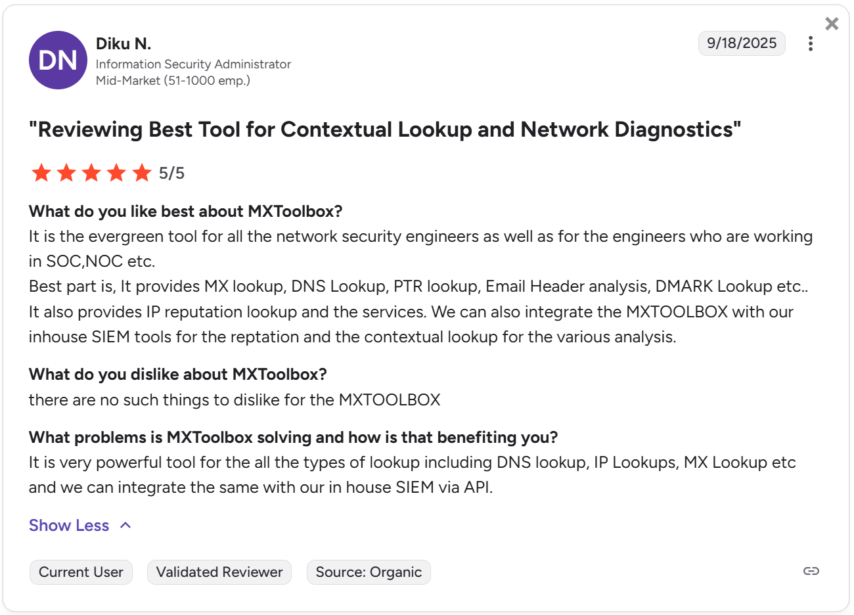
I only found 2 user reviews from 2025 on G2 for MXToolbox.
Both are positive (5/5⭐) and highlight the same core value.
Users like MXToolbox for quick technical checks.
- DNS lookups.
- MX records.
- IP reputation.
- Email header analysis.
What stands out from these reviews
- No installation or setup required
- Reliable and fast diagnostics
- Useful for engineers and technical teams
- API access for internal integrations
The takeaway
MXToolbox is trusted for diagnostics. Not for end-to-end deliverability recovery.
Key Features of MXToolbox?
MXToolbox is designed to help you inspect the technical side of email deliverability and spot configuration issues before they become serious problems.
It does not send emails or actively improve sender reputation. Its role is to surface problems clearly so you know where to look.
The platform focuses mainly on diagnostics.
What MXToolbox helps you do
- Check whether your domain or IP appears on major blacklists
- Validate SPF, DKIM, and DMARC authentication records
- Run MX and DNS lookups to identify setup errors
- Analyze email headers to trace delivery and routing issues
- Test SMTP responses to uncover server-level problems
All checks are manual and insight-driven. You get clarity, but the fixes still happen outside the tool.
MXToolbox Pricing Explained?
MXToolbox follows a freemium pricing model that works well for occasional checks but becomes restrictive as your needs grow.
The free tools are useful when you want to diagnose a single issue quickly, but they are limited in depth and monitoring.
The free version includes
- Basic DNS and MX lookups
- Manual blacklist checks
- Limited diagnostic visibility
Paid plans focus on ongoing monitoring rather than on action.
With a paid plan, you get
- Continuous monitoring of domains and IPs
- Alerts when blacklist status or DNS records change
- Access to advanced reports and API usage
You are paying for ongoing visibility, not for deliverability recovery.
Final Verdict on MXToolbox
MXToolbox does one thing well.
It helps you see email deliverability issues clearly.
If you need quick diagnostics, blacklist checks, or DNS validation, it is a reliable tool to have.
I find it especially useful when troubleshooting specific problems or confirming whether something is misconfigured.
That said, MXToolbox stops at visibility. It does not help you warm up inboxes, recover sender reputation, or improve inbox placement over time.
You still need other tools or manual work to act on what you discover.
My verdict is simple.
- MXToolbox is a strong diagnostic companion.
- It is not a complete email deliverability solution.
FAQs
1. Is MXToolbox suitable for non technical users?
MXToolbox can be overwhelming if you are new to email deliverability. It shows raw technical data and assumes you already know how to interpret and fix issues.
If you want guidance or automated help, you will need other tools.
2. Can MXToolbox help improve inbox placement directly?
No. MXToolbox does not change sender reputation or email behavior. It only reports problems. Inbox placement improves only after you take action outside the platform.
3. How often should I use MXToolbox?
I see it as an on demand tool. Use it when something breaks or when you want to verify DNS or blacklist status.
It is not something most teams actively use every day unless they pay for monitoring.
4. Is the paid version worth it?
The paid plans make sense if you manage multiple domains and want alerts when something changes. If you only need occasional checks, the free tools are usually enough.
5. Should MXToolbox be your only deliverability tool?
No. It works best as a supporting tool alongside warm up, monitoring, and sending tools. On its own, it gives visibility but not outcomes.