 Vatsal Shah
 You’re sending cold emails. The copy is solid. The subject line is strong. Everything looks right.
But you’re getting no replies.
Often, the issue isn’t with your content; it’s with your email delivery rate.
When the delivery rate drops:
- Emails land in spam or bounce back
- Your sender reputation declines
- Campaign performance slows down across the board
Yet many confuse delivery rate with deliverability and miss what’s actually going wrong.
In this guide, I’ll explain:
- What is the email delivery rate
- How does it affect your outreach
- And how to fix it when it starts falling
Let’s get started.
Email Delivery Rate — TOC
- What is Email Delivery Rate?
- Why Email Delivery Rate Matters
- What Affects Email Delivery Rate?
- Email Delivery Rate vs. Email Deliverability Rate
- What’s a Good Email Delivery Rate?
- How to Improve Email Delivery Rate (6 Key Actions)
- Tools to Help Improve and Monitor Email Delivery Rate
- My Closing Advice on Email Delivery Rate
- FAQs About Email Delivery Rate
What is Email Delivery Rate?
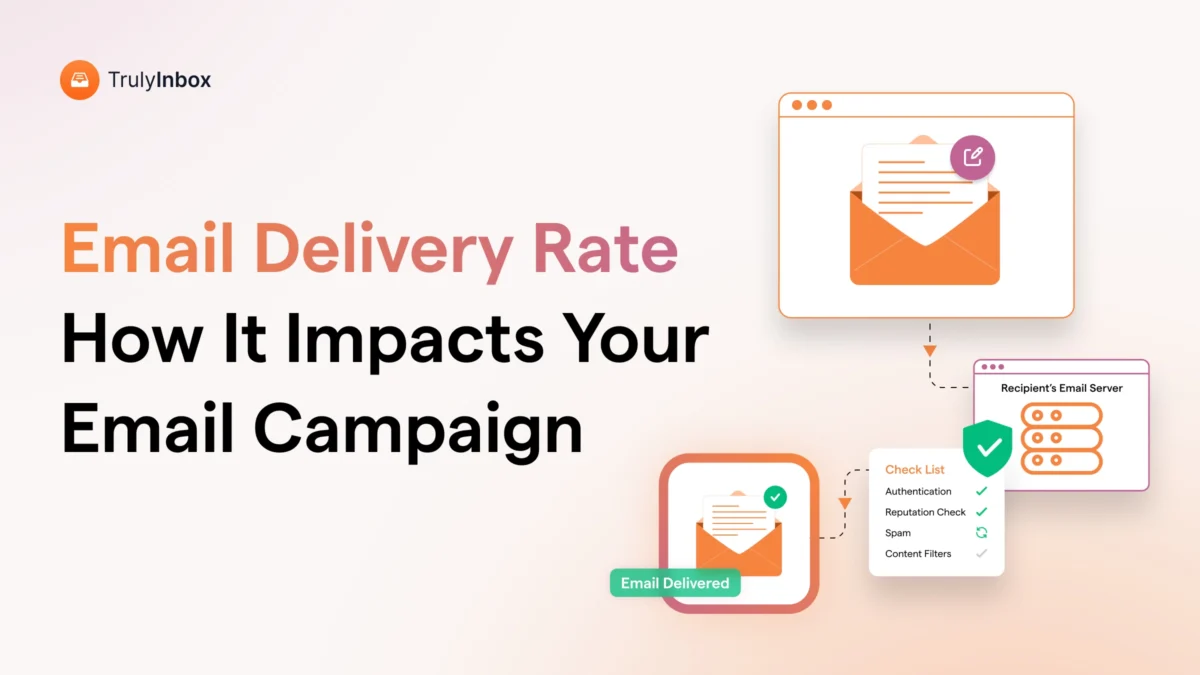
The email delivery rate is the percentage of emails that are successfully accepted by recipients’ mail servers. It doesn’t guarantee that your email landed in the inbox, only that it didn’t bounce.
For example, if you send 1,000 emails and 950 are accepted (while 50 bounce), your delivery rate is 95%.
It’s a technical metric that tells you whether your email made it past the first gate, but not where it ended up (inbox or spam).
A good delivery rate means your emails are at least reaching mail servers. A bad one? It means many of your emails are getting rejected before they even have a chance.
How do you calculate email delivery rate?
In case you aren’t sure how to know your email delivery rate, here is the formula to calculate:
Email Delivery Rate = (Delivered Emails ÷ Emails Sent) × 100
Here is an example:
1920 emails were successfully delivered out of 2,000 emails sent.
Therefore, the email delivery rate is: (1,920 ÷ 2,000) × 100 = 96%.
The 4% gap is your bounce rate, and that’s the warning sign that needs attention.
But why should you care this much about a few bounces? That’s what we’ll cover next.
Why Email Delivery Rate Matters
If you are wondering about the importance of email delivery and why it is a crucial metric in cold emailing or email marketing, here are the reasons.
- How Email Delivery Rate Impacts Your Results
- Damages Your Sender Reputation and Campaign Performance
- Leads to Poor Engagement and Wasted Effort
- Critical for Cold Email and Lead Generation Success
How Email Delivery Rate Impacts Your Results
If only 70% of your emails are delivered, 30% of your prospects never even get the message.
That’s 30% of your effort wasted before your campaign begins.
You’re not losing replies because of poor copy or weak offers. You’re losing them because your emails never reach the inbox, or any folder at all.
This hurts your pipeline early. Fewer people receive your emails, fewer open them, and fewer convert. The problem begins before performance metrics even take effect.
Email delivery rate isn’t just a backend metric. It affects how many opportunities you create.
Damages Your Sender Reputation and Campaign Performance
Poor delivery signals to email providers that you might be sending spam.
Once that happens, your emails start landing in spam or don’t get delivered at all. Even one bad campaign can harm your domain reputation.
Open rates drop. Replies slow down. Campaigns underperform.
What makes it worse? You’ve done the hard work, written strong emails, personalized them, and followed best practices. But it doesn’t matter if your domain is already flagged.
And once your reputation is damaged, recovery is a slow process. Until then, even your best emails won’t reach the inbox.
Leads to Poor Engagement and Wasted Effort
If your emails don’t get delivered, they don’t get opened. The quality of your content doesn’t matter if no one sees it.
You can spend hours creating the perfect sequence, but poor delivery makes your results look worse than they are. It creates a false picture of your strategy.
Your copy, timing, and targeting only work when the email reaches its intended recipient. Without delivery, the entire campaign falls flat, no matter how good the content is.
Critical for Cold Email and Lead Generation Success
Cold emailing relies on consistency. If your delivery rate isn’t stable, your results won’t be either.
One campaign works. The next fails. And you’re left guessing what went wrong.
Every bounced email is a missed lead. Cold outreach is already tough; delivery issues make it more complicated.
When emails don’t land, it’s impossible to trust your metrics. You can’t tell if the message is off or if it just never reached the inbox.
A substantial delivery rate changes that. It provides you with reliable data, helps you identify what’s working, and makes optimization easier.
Now, let me walk you through the key factors that affect your email delivery rate.
What Affects Email Delivery Rate
Several factors determine whether your emails reach their destination. Let me break it down for you.
1. Sender Reputation
Your sender reputation is like your credit score for email. Internet service providers (ISPs) track how recipients interact with your emails and calculate this score based on several key metrics:
- Bounce rates
- Spam complaints
- Engagement rates
- Sending volume consistency
- Authentication setup
- Domain age and history
High spam complaints or low engagement hurt your reputation. Once damaged, it can take months to rebuild your reputation and restore normal delivery rates.
2. Email List Quality
Maintaining clean list hygiene results in a good delivery rate. You’re setting yourself up for high bounce rates and spam flags if you’re using outdated contacts, purchasing unverified emails, or scraping data from the web.
Due to these factors, signals are sent to email providers, and they may consider you an untrusted sender. This hurts your domain reputation and inbox placement.
3. Domain and DNS Setup (SPF, DKIM, DMARC)
Your domain setup decides whether your emails land in inboxes or spam. SPF, DKIM, and DMARC are not optional; they are how inboxes know you are legit.
- SPF tells email providers who can send on your behalf.
- DKIM adds a signature that proves the email came from you.
- DMARC checks both and tells inboxes what to do if something fails.
Many skip the setup or trust tools blindly. But if these are misconfigured, your emails may never get seen. It is a simple step that protects your sender’s reputation and keeps your cold emails alive.
4. Sending Behavior (Volume, Frequency, Warm-up)
How you send emails matters as much as what you send. Irregular sending patterns, like blasting hundreds of emails on day one, often trigger spam filters.
This is a common mistake made by new senders. Inbox providers monitor behavior.
Sudden spikes or inconsistent volumes are seen as risky, even if the content is clean.
To build trust, start slow. New domains should begin with 50 to 100 emails per day and gradually increase volume over 4 to 6 weeks.
Consistent, gradual sending is a key part of maintaining a healthy delivery rate.
Pro Tip: If you are looking to automate your email warm-up and create personalized drafts, I highly recommend TrulyInbox. It’s what I personally use, and it has worked really well.
5. Content Quality (Spam Triggers, Formatting, Links)
Here comes the challenging step: people often make the mistake of sending emails that look sketchy. Even if it’s not the intent, your email can look like a spam email if you use promotional language in your content.
If it sounds too pushy or uses too much formatting, filters might flag it. Too many links, all capital or bold letters, and exclamation marks can make your email look shady.
Your emails should look conversational, simple, and genuine. Focus on giving value, not just selling something.
Let’s understand the difference between email delivery rate and email deliverability rate.
Email Delivery Rate vs. Email Deliverability Rate
I’ve lost count of how many times people mix these two up, and it’s a really important distinction.
Here’s the difference:
| Email Delivery Rate | Email Deliverability Rate |
|---|---|
| Measures emails that reach the recipient's mail server (accepted by the server) | Measures emails that reach the inbox (not spam, not promotions) |
| Calculated: (Sent − Bounces) ÷ Sent × 100 | Calculated: Inbox Placements ÷ Delivered × 100 |
| Focuses on basic delivery success | Focuses on the quality of inbox placement |
| Easier to measure and track | Harder to measure accurately |
| Tools to track: ESP logs, SMTP reports, bounce analytics | Tools to track: TrulyInbox, GlockApps, Mail-Tester |
As you can see, both metrics are important for a successful email campaign. But without a good delivery rate, you can’t have a good deliverability rate.
What’s a Good Email Delivery Rate
For cold email campaigns, aim for these benchmarks:
- 95% or higher: Excellent delivery rate
- 90-94%: Good delivery rate
- 85-89%: Average delivery rate (needs improvement)
- Below 85%: Poor delivery rate (immediate action required)
Most successful cold email campaigns maintain delivery rates above 95%. If the metrics are below 90%, then it suggests a serious problem with your list, domain, and sending habits.
Here are seven practical steps you can follow to improve your email delivery rate.
How to Improve Email Delivery Rate (6 Key Actions)
After working with hundreds of email campaigns, I’ve identified the strategies that actually work.
Here’s what works best for a good email delivery rate.
- Clean and Verify Your List
- Authentic Your Domain
- Warm Up Your Email Domain Gradually
- Avoid Purchased or Scraped Lists
- Send Relevant Content to Your Prospects
- Monitor Bounces and Sender Reputation
Clean and Verify Your List
Before you hit send, your list needs hygiene. That means removing invalid emails, generic role-based addresses like info@ or support@, and any contact that keeps bouncing.
But it does not stop there. You also need to check whether the emails on your list are even real. Use a verification tool. Dead addresses waste your effort.
They lower your delivery rate and signal to providers that your data is unreliable. The result? More of your emails land in spam.
I suggest doing this before every campaign. Most verification tools now even detect disposable domains, catch-all servers, and risky addresses. This helps protect your sender reputation.
All you need is a tool that tells you which contacts are safe to receive your emails. It is a basic step, but it sets the tone for your entire email performance.
2. Authenticate Your Domain (SPF, DKIM, DMARC)
In any case, if you fail to authenticate your domain, inbox providers will definitely consider you as an unknown sender. That means you have a higher chance of ending up in spam. This step is non-negotiable.
Set up SPF, DKIM, and DMARC records for your sending domain. Most email tools provide setup guides with step-by-step instructions to authenticate your domain.
A few things to keep in mind:
- Add the records to the correct domain (some people get this wrong if they’re using subdomains)
- Test them using tools like MxToolbox
- Keep DMARC aligned with SPF and DKIM
If it is a new domain, do this before sending or warming up. Once set, these records quietly build trust with inbox providers and protect your sender reputation.
Also Read: How to Set Up SPF, DKIM, and DMARC – a simple step-by-step guide to help you set up domain authentication correctly.
3. Warm Up Your Email Domain Gradually
You can start with 10-20 emails daily and then gradually increase the volume over 2-4 weeks. Don’t send 1000 emails on day one while using a new domain.
Personalize warm emails to maintain a relationship with your consumer by using their names, changing to catchy subject lines, and providing value-added content.
These ISPs track the sending patterns and sudden volume spikes that look suspicious. You will not be considered a spammer if you gradually increase the volume of your emails instead of blasting them altogether.
4. Avoid Purchased or Scraped Lists
You’d never scrape addresses from websites. Scraping emails or using outdated lists quickly kills your delivery. When you send emails to these contacts, it leads to bounces, spam complaints, and a damaged reputation, as they didn’t opt in.
If you’re purchasing a list, make sure you do it right. Purchase lists from reputable and reliable B2B vendors like Saleshandy Lead Finder, Zoominfo, or Apollo to maintain a clean, opt-in compliant database.
Even after buying these lists, do not assume they are clean. I always verify purchased lists before sending and start with small test batches to monitor performance.
People on purchased lists didn’t specifically request your emails, so engagement rates will naturally be lower. A clean list protects your deliverability more than any fancy subject line ever will.
5. Send Relevant Content to Your Prospects
Focus on the segmentation of your audience according to different criteria or fields. There is a high chance that your email will get ignored if you send the same email to everyone.
Share relevant and personalized content with your audience. This not only improves engagement but also helps internet providers recognize you as a legitimate sender.
Segment your audience by job title, pain points, funnel stage, etc. This will help you write and send relevant content to each group. Generic content can perform terribly and result in hurting your sender reputation.
Take time to understand your audience and tailor your messages to their needs and industry. ISPs notice when your emails are opened, read, and responded to. It improves how your future emails are treated.
6. Monitor Bounces and Sender Reputation
Your email delivery can drop quickly if you’re not careful.
Unverified emails, poor engagement, or spam complaints can hurt your sender reputation. Emails will start landing in the spam folders if this happens.
Track bounce rates, spam complaints, and overall sender health each week. This will help you know the issues early to prevent the damage. A quick weekly check-in will help you stay ahead.
Also, enable bounce handling in your email platform. It quietly removes bad addresses behind the scenes, keeping your sender reputation clean without extra effort.
Next, I recommend a few trusted tools that I’ve personally used to monitor and improve email delivery rates throughout my career.
Tools to Help Improve and Monitor Email Delivery Rate
The right tools make improving the delivery rate much easier. Here are my top recommendations.
| Tool | Best For | Key Features |
|---|---|---|
| TrulyInbox | Warming up email accounts and improving deliverability | Simulates real conversations, gradually increases sending volume, builds sender reputation, monitors inbox placement |
| Mailreach | Warming up new domains and restoring reputation | Gradual warm-up, sender score tracking, and detailed deliverability reports |
| GlockApps | Testing and diagnosing deliverability issues | Inbox placement tests, spam trigger analysis, SPF/DKIM/DMARC setup checks |
My Closing Advice on Email Delivery Rate
Now you know why email delivery rate is important and how it affects your cold email results.
Even the best email won’t work if it never reaches the inbox. This is a common issue, but it’s something you can fix.
If you’re not sure where to start, here’s a simple step:
➜ Try TrulyInbox for email warm-up (it’s free to start)
It helps you build trust with inbox providers and improves your delivery rate, so more people actually see your emails.
Just set it up and let it run in the background while you focus on your outreach.
FAQs About Email Delivery Rate
1. What’s the ideal email delivery rate for cold email campaigns?
According to me, you should aim for 95% or higher for cold email campaigns. From what I’ve seen, anything below 90% indicates serious problems that need immediate attention.
2. Can a low delivery rate affect my domain reputation?
Yes, absolutely. After researching several alternatives, I can confirm that low delivery rates directly damage your domain reputation and create a negative cycle where future emails become harder to deliver.
3. How do I know if poor delivery is due to my list or my content?
From what I’ve seen, you can test this by sending the same content to a verified, engaged list. If delivery improves dramatically, your list quality is the problem.
4. What’s the difference between soft and hard email bounces?
There are two types of email bounces.
- Hard bounces happen when an email cannot be delivered at all, usually due to invalid addresses or domains that do not exist.
- Soft bounces are temporary, caused by things like full inboxes or temporary server issues.
5. Do email verification tools also improve deliverability?
After researching several alternatives, email verification tools improve the delivery rate by removing invalid addresses. However, they indirectly help deliverability by maintaining list quality and sender reputation.