 Vatsal Shah
 Most cold emailers use “verification” and “validation” interchangeably. That confusion isn’t just semantic.
When you blur the line between these two steps, you end up skipping one of them. And skipping either one leads to bounces, reputation damage, or both.
I run TrulyInbox and work with cold email teams daily. The pattern I see is almost always the same:
- Someone “verifies” their list and assumes they’re covered.
- They blast a campaign from a fresh domain.
- Half their emails land in spam.
The problem isn’t the tool. It’s that they didn’t understand what that tool actually did, and what it didn’t.
This blog breaks down everything you need to sort that out. Specifically, it covers:
- What verification and validation each do at a technical level
- Where they sit in your cold email workflow
- How to handle grey-zone results like catch-alls and unknowns
- The critical step after list cleaning that almost nobody talks about
TL;DR — Email Verification vs Email Validation in 60 Seconds
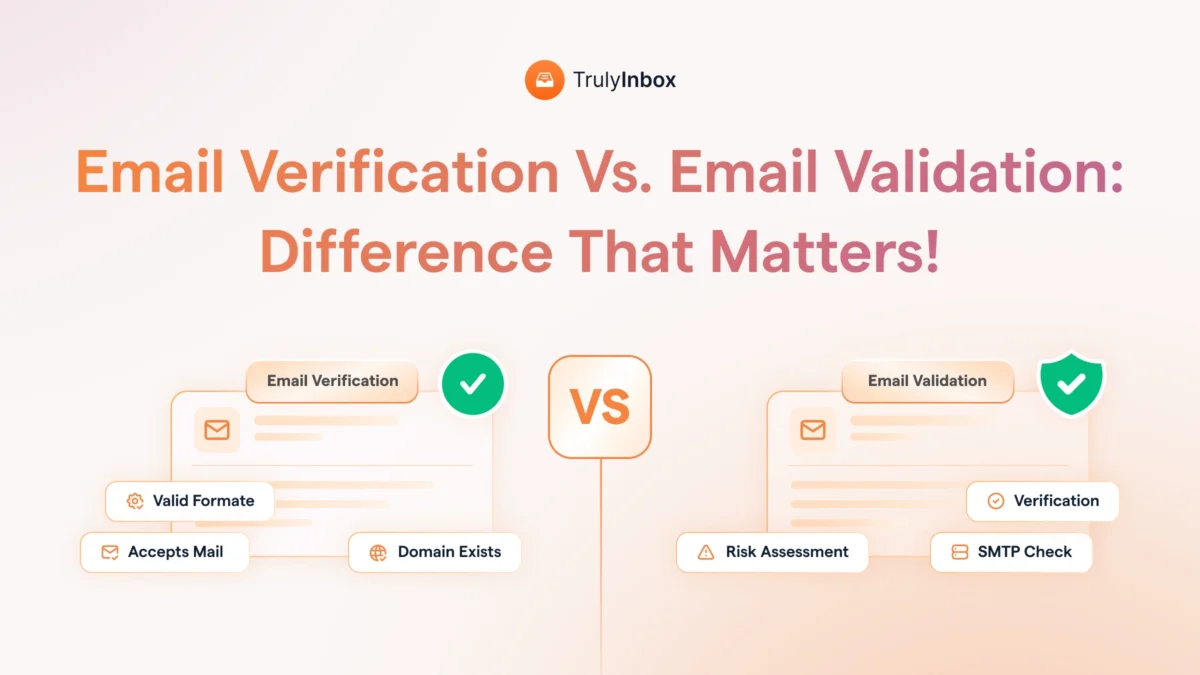
Email validation checks if an address looks right. It scans for formatting errors, broken syntax, and fake domains.
Email verification checks if the mailbox actually exists. It pings the mail server to confirm the address can receive messages.
Here’s the simplest way to think about it:
- Validation catches typos like “gmial.com” and disposable addresses like Mailinator.
- Verification catches dead mailboxes, deactivated accounts, and spam traps.
Both are pre-send steps. You need both before launching any outbound campaign.
But even a perfectly verified list will underperform if you send from a domain with zero reputation. Verification cleans the list, while warm-up prepares the sender.
A few numbers worth keeping in mind:
- Google flags senders who exceed a 2% bounce rate under its Bulk Sender Guidelines.
- A single campaign to an unverified list can tank your inbox placement for weeks.
- 15 to 30% of B2B lists return catch-all results, and most senders have no plan for handling them.
We’ll cover all of this below, including what to actually do with those catch-all results.
What Is Email Validation? (The Format Check)
Email validation is the first layer of email list hygiene.
It checks the structure of an address without ever contacting a mail server.
Think of validation as the gatekeeper at the door. It stops obviously bad addresses, but it can’t tell you if someone actually lives inside.
Here’s what validation checks:
- Syntax check. Does the address follow standard formatting? It looks for an @ symbol, a valid domain extension, no spaces, and no illegal characters.
- Domain validation. Does the domain actually exist and have DNS records?
- Disposable email detection. It flags temporary providers like Guerrilla Mail, Tempmail, and Mailinator.
- Typo detection. It catches common misspellings like “gmial.com” instead of “gmail.com.”
- Role-based address flagging. Addresses like info@, support@, and admin@ aren’t invalid, but they carry risk for cold outreach.
These checks follow the rules defined in RFC 5321, the standard for email formatting.
Most validation tools use regex patterns to run these checks, though regex has known limitations with edge cases.
The key takeaway is simple. A perfectly formatted address can still belong to a dead mailbox. Validation confirms the format, not the person.
When Validation Alone Is Enough
Validation works fine on its own in specific situations. Real-time form validation on sign-up pages is the most common example.
When people type their own email into a form, validation catches input errors instantly.
Double opt-in flows and newsletter subscriptions fall into this category too.
However, for scraped lists, validation alone is never enough.
Those lists need verification because no one is confirming their own address at the point of entry.
What Is Email Verification? (The Existence Check)
Email verification goes a level deeper than validation. It actively pings mail servers to confirm the mailbox is real and can receive messages.
This process is slower and more resource-intensive because it requires actual server communication.
Here’s what happens under the hood:
- MX record lookup. The tool checks if the domain has a mail server configured to receive email.
- SMTP handshake. It connects to the mail server and simulates a send without actually delivering anything.
- Catch-all detection. It identifies domains that accept all incoming mail, regardless of whether the specific mailbox exists.
- Spam trap detection. It flags known spam trap addresses designed to catch senders with dirty lists.
- Greylisting handling. Some servers temporarily reject verification pings, which produces “unknown” results.
The SMTP handshake is where the real work happens. The sequence looks like this:
- HELO: The verification tool introduces itself to the mail server.
- MAIL FROM: It declares a sender address.
- RCPT TO: It asks the server if the target mailbox exists.
- The server responds with a code.
Those response codes tell the whole story:
- 250 means the mailbox is valid and accepting mail.
- 550 means the mailbox doesn’t exist.
- 450 means a temporary failure occurred, and the result is inconclusive.
This is why verification takes longer than validation and why results aren’t always definitive.
Why Verification Results Aren’t Always Black and White
Most people expect verification to return a clean “valid” or “invalid” label. The reality is more complicated.
Good verification tools return five to seven status categories, not just two. Beyond valid and invalid, you get catch-all, unknown, risky, and accept-all results.
This grey zone is where most cold emailers make mistakes. Some send to everything that isn’t explicitly invalid, which is risky. Others delete everything that isn’t explicitly valid, which is wasteful.
We’ll cover exactly how to handle each category in a dedicated section below.
Email Verification vs Email Validation — Side-by-Side Breakdown
This comparison table puts the key differences in one place. Bookmark it for quick reference.
| Feature | Email Validation | Email Verification |
| What it checks | Format, syntax, domain structure | Mailbox existence, server response |
| How it works | Pattern matching against formatting rules | SMTP handshake with the mail server |
| Speed | Fast, near-instant | Slower, requires server pings |
| Accuracy for format issues | High | Low (not its job) |
| Accuracy for deliverability | Low | High |
| Server contact required? | No | Yes |
| Catches bounces? | No | Yes |
| Catches spam traps? | No | Yes |
| Best used when | Cleaning formatting errors, real-time form input | Confirming mailbox existence before campaigns |
| Limitations | Can’t confirm if the mailbox exists | Can’t catch typos or syntax errors |
Two misconceptions show up constantly:
- “Validation verifies emails.” No. Validation only checks format. It never contacts a mail server.
- “Verification catches typos.” No. If “[email protected]” follows valid syntax rules, verification will try to ping it. Validation catches the typo first.
Where Each Step Fits in Your Cold Email Workflow
This is the section most blogs skip entirely. Every competitor defines verification and validation, but nobody maps them to an actual outbound pipeline.
Here’s the complete workflow, step by step:
- Build or buy your list. This is your lead sourcing step. Quality here determines everything downstream.
- Validate. Strip formatting errors, disposable addresses, and role-based addresses. This is a fast batch process.
- Verify. Confirm mailbox existence and flag catch-alls and unknowns. This step is slower because it requires server pings.
- Segment. Separate verified-valid addresses from catch-all and unknown results. Each group gets a different sending strategy.
- Warm up your sending domain. A verified list sent from a cold domain still lands in spam. Email warm-up builds your sending reputation gradually.
- Send. Launch your campaign with a clean list and a warmed domain.
Most teams stop at step three and jump straight to sending. That’s the mistake I see cold email teams make constantly.
They verify their list, feel confident, blast 5,000 emails from a fresh domain, and wonder why 60% lands in spam.
The list was clean, but the sender had no reputation.
The order matters. Verify first, then warm up. Warming up while sending to an unverified list just accelerates reputation damage.
What to Do With Catch-All, Unknown, and Risky Results
After you verify a list, 15 to 30% of a typical B2B list comes back in a grey zone. Most senders either ignore these results or panic-delete them.
Both approaches are wrong. Here’s how to handle each category:
1. Catch-all domains
These domains accept all incoming mail regardless of whether the specific mailbox exists. The server says “yes” to everything, so verification can’t confirm the individual address.
What to do:
- Send to catch-all addresses in small batches, separate from your verified-valid segment.
- Monitor bounce rates closely after each batch.
- Remove any address on the first hard bounce.
2. Unknown or unverifiable results
Some results come back as unknown because of greylisting, rate limiting, or server timeouts. The verification tool simply couldn’t get a clear answer.
What to do:
- Re-verify these addresses after 24 to 48 hours.
- If they still return as unknown, treat them as risky.
- Don’t include them in your primary sending segment.
3. Role-based addresses
Addresses like info@, sales@, and support@ are technically valid. However, multiple people typically monitor them, and they carry higher complaint risk for cold outreach.
What to do:
- Exclude them from cold email campaigns.
- Only use them if you have no other contact at a target company.
Here’s a useful rule of thumb.
If your list is more than 20% catch-all, your list source is the problem, not your verification tool.
That percentage signals low-quality data at the source level.
What Happens When You Skip Verification (Real Deliverability Impact)
Skipping verification isn’t just careless. It creates compounding damage that can take weeks to reverse.
Here’s what actually happens:
1. Hard bounces trigger penalties.
Google’s Bulk Sender Guidelines set the threshold at 2% for bounce rates. Exceed that, and your inbox placement drops immediately.
2. Bounce damage compounds.
One bad campaign can suppress your
3. Domain reputation takes the hardest hit.
Most senders think about IP reputation, but domain reputation matters more. And it takes significantly longer to rebuild.
4. The phantom problem.
Some senders verify once and reuse the same list for months. Email addresses decay at 2 to 3% per month. A list you verified in January is 15 to 20% degraded by July.
5. Spam traps are the silent killer.
You won’t know you hit one until your domain lands on a blacklist. Verification tools detect known spam traps before you send.
Let’s put numbers on this. Say you send a 10,000-email campaign with a 5% bounce rate. That’s 500 bounces.
Your domain reputation takes a direct hit. Your next three campaigns land in spam.
Depending on your deal size, that could mean thousands of dollars in lost pipeline.
Re-verify before every major campaign. Treat any list older than 90 days as stale.
The Step After List Cleaning That Most People Ignore
A clean list doesn’t fix a cold domain. If your sending domain has no history, ESPs treat your emails with suspicion regardless of list quality.
That missing step is email warm-up.
Warm-up builds your sending reputation gradually. It starts with small volumes and positive engagement signals, then escalates over time.
Here’s why both verification and warm-up matter:
- Verification removes risk from the list side. It ensures the addresses you’re sending to are real.
- Warm-up removes risk from the sender side. It ensures ESPs trust your domain enough to deliver your emails.
Skip either one, and your inbox placement suffers.
The timelines are different too.
Verification is a one-time batch process that takes minutes to hours. Warm-up is ongoing.
- New domains need two to four weeks of warm-up before you scale volume.
- Established domains benefit from continuous warm-up to maintain reputation.
It’s the natural next step in the pipeline, and ignoring it is the most common reason clean lists still underperform.
Best Email Verification Tools to Clean Your List
You don’t need a deep dive here. Just a quick reference to the tools worth knowing.
- ZeroBounce. Strong accuracy with built-in spam trap detection. Good for large lists with high data quality requirements.
- NeverBounce. Simple, fast, and reliable for bulk verification. Offers real-time verification APIs for sign-up forms.
- MillionVerifier. Budget-friendly option for high-volume lists. Handles large batches efficiently at a lower price point.
- Clearout. Combines verification with catch-all detection and disposable email flagging. Solid all-around option.
Each tool handles the core job well. The differences come down to pricing, speed, and how they handle edge cases like catch-all domains.
For a detailed breakdown, see our guide to the best email verification tools.
FAQs About Email Verification vs Email Validation
1. Is email verification the same as email validation?
No. Validation checks formatting and syntax. Verification confirms the mailbox exists and can receive mail.
Most tools do both automatically, which is why the terms get confused.
2. Do I need both email verification and email validation?
Yes. Validation catches input errors and fake formats. Verification catches dead mailboxes and spam traps.
Skipping either one leaves gaps in your list hygiene.
3. How often should I verify my email list?
Verify before every major campaign. Email lists decay at 2 to 3% per month as people change jobs, deactivate accounts, and shut down domains.
Any list older than 90 days needs re-verification.
4. What’s a catch-all email and should I send to it?
A catch-all domain accepts all incoming mail regardless of whether the specific mailbox exists. This means verification can’t give you a definitive answer.
Send to catch-all addresses in small batches. Monitor bounce rates and remove any address on the first hard bounce.
5. Does email verification prevent spam complaints?
No. Verification confirms the address exists, not that the recipient wants your email.
Clean lists reduce bounces, not spam reports. Spam complaints are a permission issue, not a verification issue.
6. What bounce rate is too high?
Google’s Bulk Sender Guidelines set the threshold at 2% for bulk senders. Exceed that, and you risk inbox placement drops and sending restrictions.
7. Can I just validate emails without verifying them?
Only for inbound sign-up forms with double opt-in. In that scenario, people confirm their own addresses, so validation catches the input errors that matter.
For cold outreach or purchased lists, verification is non-negotiable. Validation alone won’t catch dead mailboxes or spam traps.