
 Vatsal Shah
 MailReach promises one thing: better deliverability.
As a deliverability expert, this immediately caught my attention.
I had to see if it truly lives up to the hype, so I subscribed to MailReach and tested it on a mix of new and existing domains I planned to use for cold outreach.
In this MailReach review, I share the results of 2 months of testing:
- What worked
- What did not
- How consistent the inbox placement really was
- Whether I would recommend it to someone starting cold outreach in 2026
- And more
I have also shared alternatives to MailReach, such as TrulyInbox and Inbox Radar, that might better fit your use case.
Keep reading!
MailReach Review – TOC
- TL;DR – My Honest Review of MailReach
- What Is MailReach?
- Key MailReach Features I Tested (And What You Can Expect)
- How Much Does MailReach Cost?
- Pros and Cons of MailReach
- What MailReach Users Are Saying on G2, Capterra, and Reddit
- The Best MailReach Alternatives for 2026
- My Verdict – Should You Get MailReach in 2026?
- FAQs
TL;DR – My Honest Review of MailReach
Here is a quick summary of my two months of testing:
MailReach’s Email Warm-Up Capabilities
- You’ll see better deliverability on both new and existing domains, as long as the reputation isn’t already too damaged. ✅
- The major drawback is the pricing. It’s quite expensive since you pay per inbox, which quickly adds up if you manage multiple accounts. ❌
- A better alternative is TrulyInbox. You can connect unlimited email accounts for a flat price and still get the same results.
MailReach’s Spam Testing Capabilities
- You can see where your emails land in the inbox, whether Primary, Promotions, or Spam. ✅
- You get actionable suggestions on both setup and email content that help you identify and fix issues affecting deliverability. ✅
- The main limitation is that results aren’t very accurate for B2B senders, since there aren’t many professional inboxes in the testing pool. ❌
- A better alternative for serious cold email senders is Inbox Radar by Saleshandy. You can test your emails across 6 ESPs and check placement in 40+ professional inboxes for far more reliable results.
For a more detailed breakdown, keep reading!
What Is MailReach?
MailReach is an email warm-up and spam testing tool.
You can use it to warm up new email accounts and build a strong sender reputation with ESPs like Gmail and Outlook.

MailReach does this by mimicking human-like sending and engagement:
- Sends real-looking emails from and to your account
- Opens and replies to those emails
- Marks them as important
- Moves them out of spam folders
Beyond warm-up, MailReach also helps you see exactly where your emails will land in the inbox (Primary, Promotions, or Spam) before launching your campaigns.
Now that you know what MailReach does, let me show you how it actually performs when put to the test.
Key MailReach Features I Tested (And What You Can Expect)
I tested MailReach by warming up multiple new domains and a few older ones that had deliverability issues.
I also used the spam testing feature before launching my campaigns to check where my emails would land and what changes could improve inbox placement.
Here is a breakdown of what I found while testing its two main features:
1. Email Warm Up
MailReach’s warm-up feature is simple to use and does exactly what it claims.
I liked that you can customize your warm-up settings based on how aggressive or cautious you want to be.

Once everything’s configured, the process runs quietly in the background.
Coming to the results, my new email accounts started showing positive signs after around 30 days of use.
Older accounts with mild deliverability issues were also recovered within a few weeks.
Pro Tip: Keep the warm-up running with less volume even while you’re sending campaigns. It helps maintain your domain reputation throughout your outreach.
I was happy with the results, but there were 2 painful downsides:
- MailReach does not have a free plan for its warm-up feature, so you have to pay up front.
- It is expensive as you are charged per inbox. Other user reviews also mention the same.
For warming up my 7 email accounts, I ended up spending around $273 in total ($136.50 per month – $19.50 per inbox).
If you need a cost-effective option that delivers the same results, TrulyInbox is a great pick.
It also offers a forever-free plan, so you can test the tool before committing.
2. Email Spam Test
MailReach’s spam test feature turned out to be quite helpful when I wanted to see how my campaign emails would perform across different inboxes.
It has over 30 real email accounts spread across major providers like:
- Google Workspace
- Microsoft Outlook365
- Gmail
- Outlook
- Hotmail
When I ran my tests, MailReach sent my campaign emails to these inboxes and showed me exactly where they landed: Primary, Promotions, or Spam.
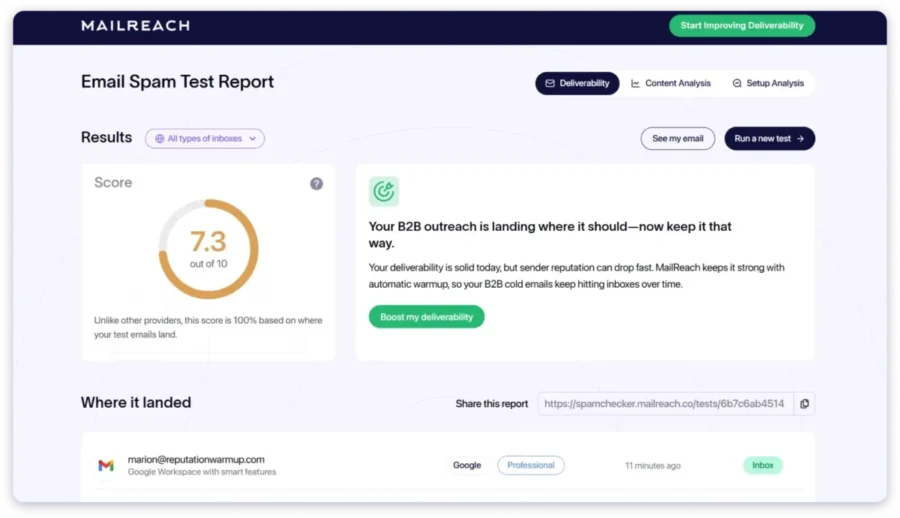
This helped me in 2 ways:
- I could see how my new email accounts were performing after warm-up.
- I could check whether my existing accounts had taken a hit after outreach and needed any corrective action.
Moreover, MailReach also runs a few extra checks, including:
- Email blacklist scan
- SPF, DKIM, and DMARC validation
- Spam-word analysis
- Reverse DNS check
If there’s anything that could hurt your deliverability, MailReach will highlight it clearly.

That said, the accuracy for B2B domains was a bit off. I was using another spam testing tool at the same time to cross-validate my results.
The reasons: MailReach has 4 sets of seed lists for testing, each having ~18 professional inboxes spread across Google Workspace and MS O365.
That’s not enough to get a truly accurate picture of deliverability across business environments!
So, MailReach’s spam testing works fine for basic checks, but if you need accurate results, I suggest you check an alternative like Inbox Radar by Saleshandy.
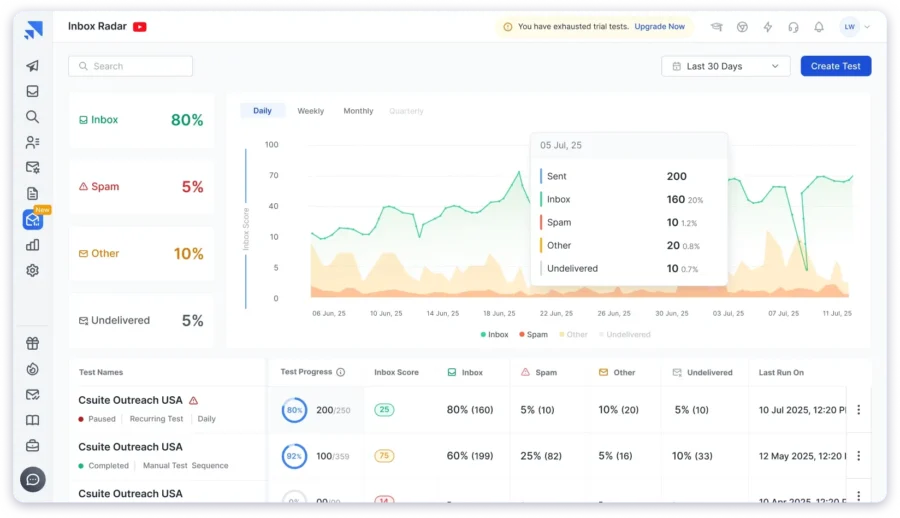
Here is why →
Inbox Radar covers 6 ESPs:
- Google Workspace
- Microsoft 365
- Zoho
- Gmail
- Outlook
- Yahoo
Plus, it has 40+ professional inboxes in its testing pool of over 50 real accounts, giving a much more reliable view of where your emails actually land.
You can take a free test and see the results for yourself
How Much Does MailReach Cost (2023)
MilReach has 2 plans:
Here is the breakdown
1. All-In-One (Email warm up + Spam tester)
This plan is ideal if you want the complete deliverability package from MailReach.
The plan is fully customizable based on your needs.
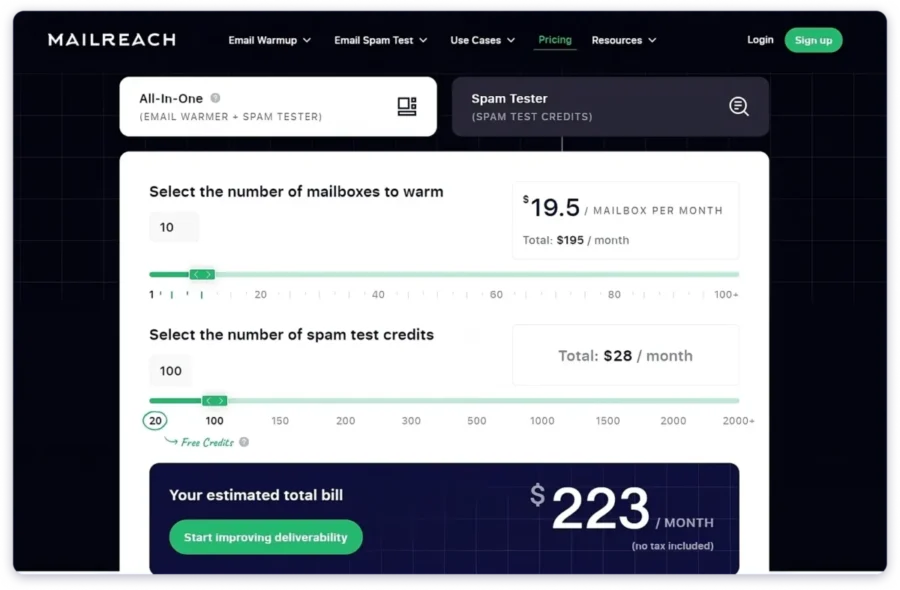
You are charged according to the number of mailboxes you warm up and the number of spam test credits you use.
Also, the per-inbox cost decreases slightly when you connect more accounts.
2. Spam Tester
This is a credit-based plan designed for users who only want to check inbox placement without using the warm-up feature.
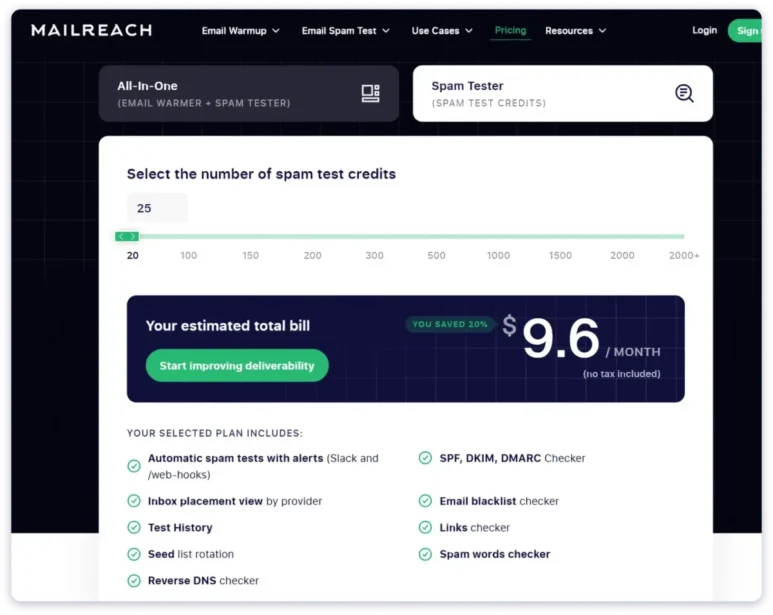
You can either subscribe to a monthly plan or choose a pay-as-you-go option.
- The monthly plan costs $9.60 per month for 25 credits.
- The pay-as-you-go option costs $12 for the same number of credits.
Pros and Cons of MailReach
Pros
- The warm-up process feels authentic, with realistic sends and replies.
- You can customize warm-up volume and pacing or let it run automatically.
- The spam test feature provides a clear view of inbox placement across major ESPs.
- Extra technical checks (SPF, DKIM, DMARC, blacklist, spam words) help identify issues early.
- Simple, easy-to-use dashboard that doesn’t overwhelm you with data.
Cons
- Email warm-up has no free plan — you need to pay upfront to start.
- The warm-up feature is expensive because it’s priced per inbox.
- Limited B2B inbox coverage in spam testing (only ~18 professional inboxes).
What MailReach Users Are Saying on G2, Capterra, and Reddit
- G2 User Rating – 4.7/5🌟 (42 Reviews)
- Capterra – 5/5🌟 (22 Reviews)
- Trustpilot – 3.6/5🌟 (4 Reviews)
There were not many reviews on Trustpilot, and they did not provide clear insights into how the tool actually performed, so I skipped it.
When I checked Capterra, every single review was rated 5 stars.
All users praised how well the warm-up feature worked, which matched my own experience with it.
Even on G2, most recent reviews were 5 out of 5, with users again saying that the tool performed well.

It was the same story on Reddit. Most users agreed that MailReach works, but some shared that it is overpriced for small teams.
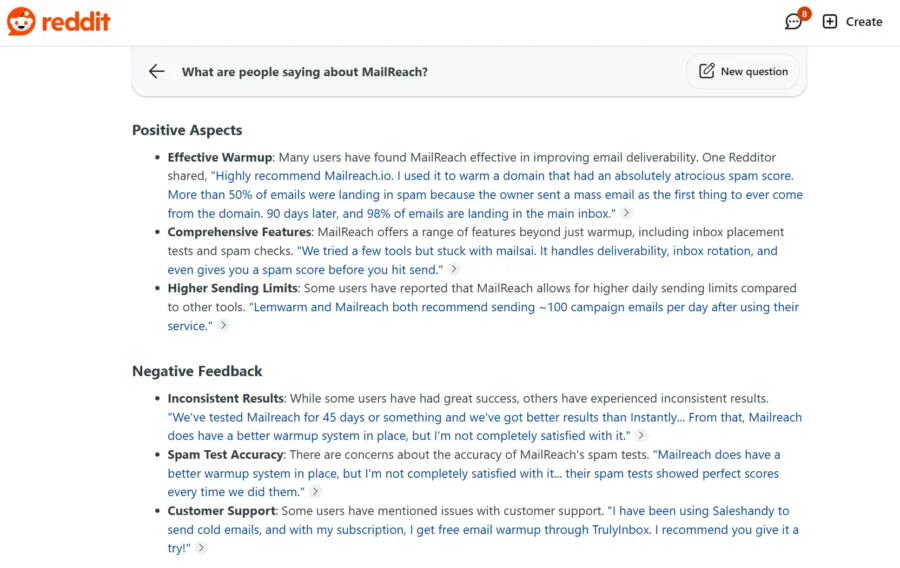
P.S. I used Reddit Answers to quickly find the most relevant threads discussing MailReach.
Overall, users across G2, Capterra, and Reddit agree that MailReach delivers solid results and does exactly what it claims.
The Best MailReach Alternatives for 2026
While MailReach performs well, it does come with some drawbacks like high pricing and limited spam test accuracy for B2B senders.
If you are looking for tools that deliver similar or even better results, here are two strong MailReach alternatives to consider in 2026:
- TrulyInbox – affordable and scalable warm-ups.
- InboxRadar by Saleshandy – advanced deliverability testing and detailed spam insights.
1. TrulyInbox
TrulyInbox is an AI-powered email warm-up platform that helps improve the sender reputation of your email accounts.
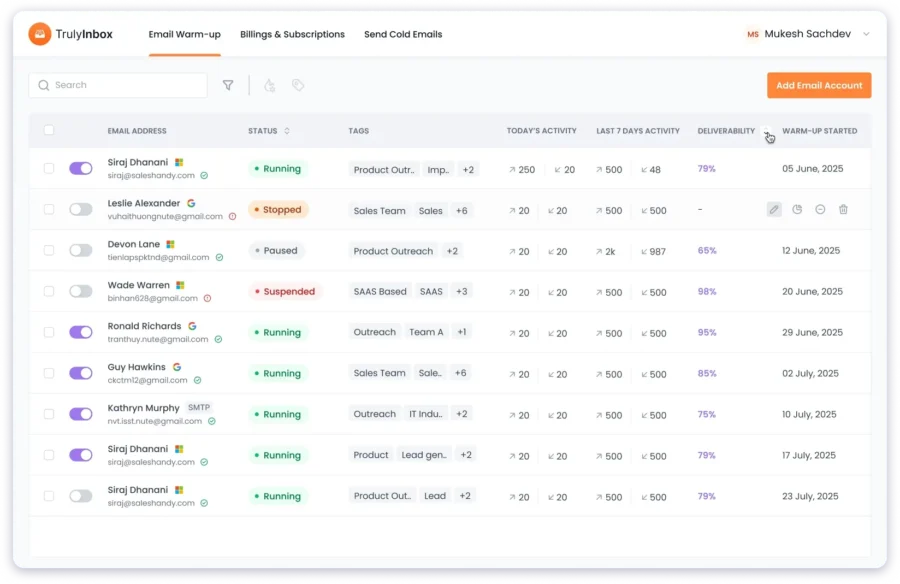
How it works in practice:
You can connect multiple Gmail, Outlook, and other SMTP accounts with ease.
There are options to customize your warm-up, or you can let it run in the default settings.
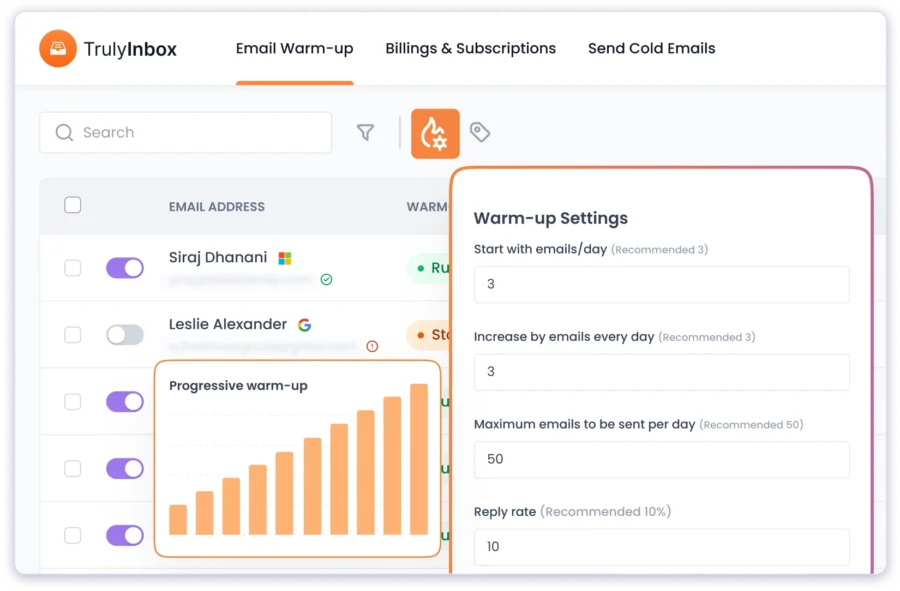
Once started, TrulyInbox will automatically start sending personalized content to and from your email accounts.
It will also mimic human sending and engagement behaviour to naturally boost the sender reputation.
Strengths I noticed:
- Flat pricing by warm-up volume, you can connect many accounts without paying per inbox.
- Easy controls for starting volume, daily increase, and daily cap.
- Warm-up behavior looks natural, and engagement is consistent.
Tradeoffs to keep in mind:
- Focused on warm-up, not an all-in-one deliverability suite.
- Reporting is clear and useful, but not analytics-heavy.
So, if you need the same results as MailReach, but without the hefty price tag, TrulyInbox is the better fit.
Compare TrulyInbox vs Mailreach in detail to find the right email warm-up tool.
2. InboxRadar by Saleshandy
Inbox Radar is an inbox placement testing and deliverability analysis tool that you can use to see where your emails will land in the inbox before starting your campaigns.
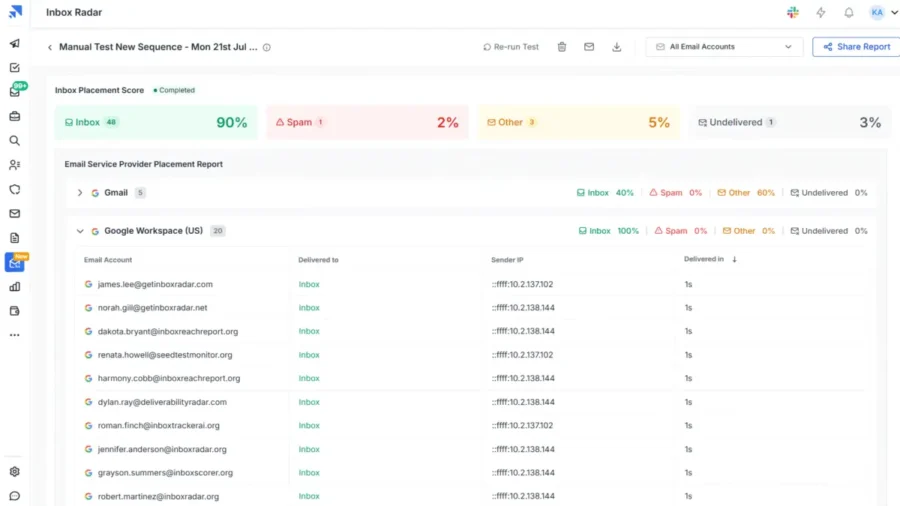
How it works in practice:
I sent campaign samples and checked placement against a larger pool of professional and personal inboxes across major ESPs like:
- Google Workspace
- MS O365
- Zoho
- Gmail
- Outlook
- Yahoo
It showed where exactly my emails would land (Primary, Promotions, or Spam) if I launched my campaign.
Moreover, InboxRadar also gives you an ESP-to-ESP placement report that breaks down how your service provider performs across other email service providers.
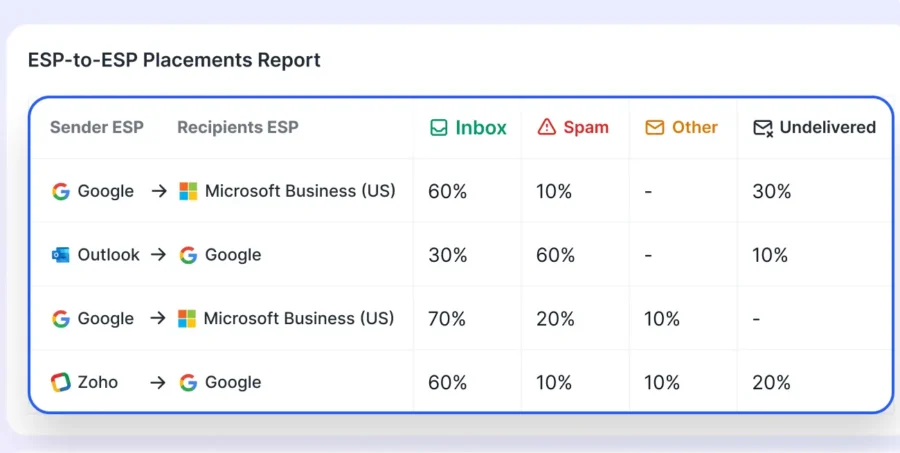
This helped me identify which of my sending accounts had deliverability issues with specific ESPs. I was then able to adjust my outreach strategy better to improve the success of my campaigns.
Strengths I noticed:
- The testing pool has more than 40 professional accounts, so B2B signals are more trustworthy.
- Clear advice on SPF, DKIM, DMARC, DNS, and content issues.
- Checks IP and Domain blakclists on 30+ databases
- Lets you schedule and customize tests to track placement over time.
Tradeoffs to keep in mind:
- It is a placement testing tool, not a warm-up tool. You will still need a warm-up solution.
- You will get many technical signals. That is helpful, but it does expect you to act on them.
That said, if you wanted TrulyInbox and Inbox Radar in one place, you should look at Saleshandy!
It is an AI-powered cold outreach automation software that helps you connect with relevant prospects and build your revenue pipeline.

Saleshandy and TrulyInbox have partnered so that you can have a complete cold outreach solution.
Check out my Saleshandy Review to know how you can use it to automate lead generation for your business.
My Verdict – Should You Get MailReach in 2026?
After using MailReach for two months, I can say it delivers on its core promise.
It genuinely improves deliverability and builds domain reputation.
Other real users also agree with the same.
That said, I found that the pricing can be painful, especially if you manage multiple domains or client accounts.
Paying per inbox adds up quickly!
The spam test accuracy is decent, but not strong enough for serious B2B use.
This is where MailReach’s alternatives come in:
- TrulyInbox – Cost-efficient and scalable warm up.
- Inbox Radar – Highly accurate spam and inbox placement testing with granular insights to fix deliverability.
However, if you want an all-in-one solution for warming up, sending cold emails, monitoring deliverability, and ultimately booking more meetings, Saleshandy is a good choice.
P.S. I enjoy testing and reviewing tools, especially those that claim to improve deliverability.
Check out my other reviews if these tools are also on your radar:
- Folderly Review: My Honest Take After Testing It
- Warmy.io Review: Does It Actually Improve Deliverability?
- Warmbox Review: Is It Worth The Cost?
- InboxAlly Review: Features, Pros, Cons, Pricing, And More!
- Warmup Inbox Review: Is This Tool Worth The Money?
- Complete Lemwarm Review: Is It Worth It?
FAQs
1. Is MailReach Designed for Warming Up Cold Email Senders or Marketing Senders?
MailReach is mainly designed for cold email senders who need to build or repair domain reputation before doing outreach. It’s not meant for bulk marketing or promotional campaigns.
2. Can MailReach Be Used for Multiple Domains or Client Accounts?
Yes, but you’ll need to pay per inbox. That makes it practical for individuals or small teams but expensive for agencies managing multiple domains.
3. Can MailReach Integrate With Other Cold Email Outreach Tools?
MailReach doesn’t have direct native integrations with outreach tools like Instantly or Smartlead, but you can connect your inboxes from those platforms using SMTP or IMAP.
4. How Long Does It Take for MailReach to Improve Email Deliverability?
In my testing, new domains started showing improvement in about 30 days, while older domains with mild issues took 2–3 weeks. Severely flagged domains may not recover fully.
5. What Is the Ideal Daily Warm-Up Volume When Using MailReach?
Start small and increase gradually. I recommend starting with 5 emails per day and scaling up by 2 per day for 2 to 3 weeks. MailReach can also automate this scaling for you.
6. Can MailReach Help Recover a Domain That’s Already Marked As Spam?
Partially. MailReach can improve a domain with minor issues, but if your domain is heavily blacklisted or flagged, recovery is unlikely. In that case, it’s better to start with a fresh domain.
7. Is There a Trial Version or Free Plan Available for MailReach?
No, MailReach doesn’t offer a free plan or trial for its email warm-up feature. However, you can run a free spam test from Mailreach’s website.
8. Why Are MailReach Users Shifting to Better Alternatives?
Most users switch due to pricing and scalability. Tools like TrulyInbox offer unlimited warm-ups for a flat cost, and Inbox Radar provides more accurate B2B inbox testing — both making MailReach less cost-efficient.
9. Are There Other MailReach Alternatives Apart From TrulyInbox and Inbox Radar?
Yes, there are, in fact, I have written an entire blog on them. Check out my 9 best MailReach alternatives & competitors.