

On 2 October, we start rolling out TrulyInbox V2.
It’s a rebuild, not an update. We rebuilt the warmup engine, added checks that watch your sender reputation every day, and redesigned the app from the ground up.
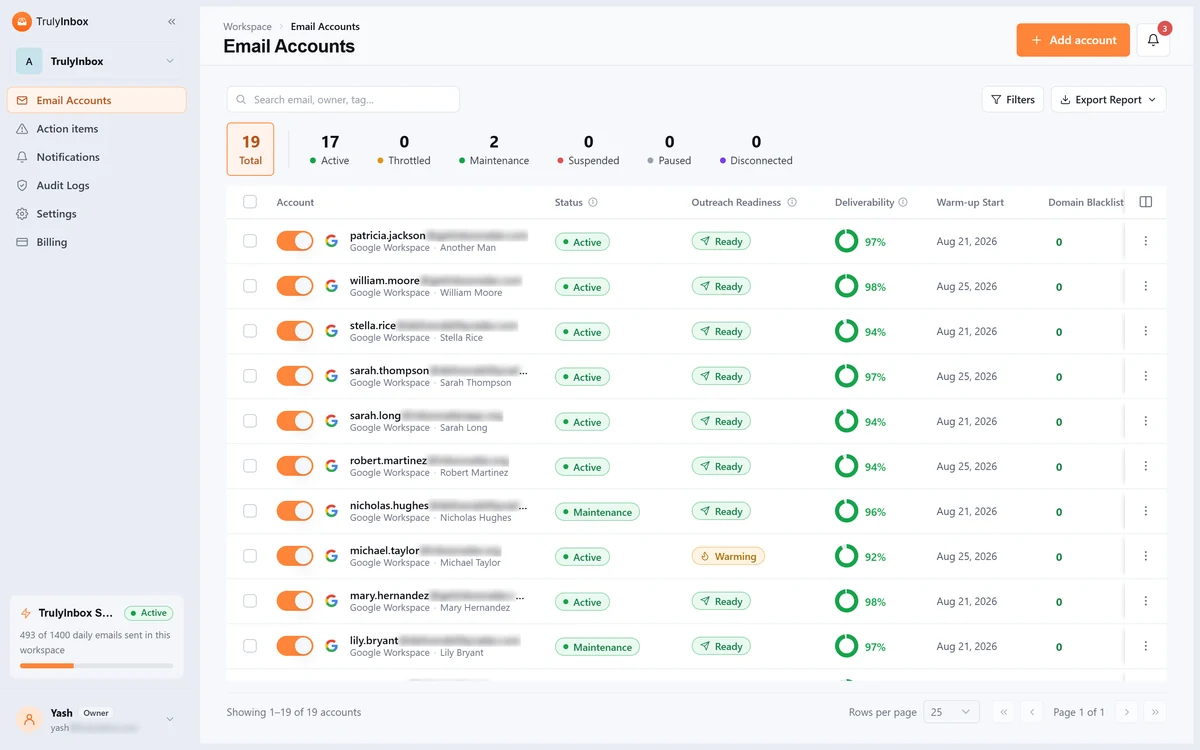
You don’t need to do anything. We’ll move your mailboxes over for you, so there’s nothing to reconnect.
Here’s why we built it, and what you’ll find when it reaches your account.
What Is Different?
If you already use TrulyInbox, this is the fastest way to see what changes on 2 October.
| Features | Before | Now |
| Warmup strategy | Four to choose from, Flat, Progressive, Random or AI, with a minimum and a maximum you set | One AI strategy. You set the most a mailbox may send in a day, and the AI works out everything else |
| Warmup pool | One shared pool of 40k+ accounts | Upgraded network of 50K+ accounts. Plus, recipients are matched by reputation pool, so a new mailbox never writes to a proven one |
| Deliverability score and reputation score | A deliverability score, shown when you looked, with nothing kept | The deliverability score is unchanged: of the warmup emails sent, how many reached the inbox. New beside it, a reputation score out of 100 from the last 15 days, with a 30-day chart |
| DNS and blacklist monitoring | Checked when you asked | Six DNS checks, plus 44 domain and 38 IP blacklists, checked automatically on a regular schedule, with a one-click re-check |
| Workspaces and team collaboration | Every mailbox in one account, one login | A separate workspace for each client or brand, each with its own warmup budget, your team invited across four roles, and an audit log of who changed what |
| Proactive fixes (Action Items) | Action Items existed, but you went looking | Every problem is surfaced as it appears, with the steps to fix it |
| Integration | An API, and that was it | Partner Integration, so another SaaS product can run TrulyInbox warmup inside its own app, plus a rebuilt API for your own workflows |
| Positive interactions | Warmup mail was opened, starred, replied to and pulled out of spam | The same, plus back-and-forth conversation threads and forwarding that loops in your other warmup mailboxes on the same domain |
Why We Rebuilt TrulyInbox
Most of the spam problems we help customers fix are not warmup problems.
A DKIM record breaks after a DNS change. A domain lands on a blacklist. A reputation slips for weeks before anyone thinks to look.
The rules also got stricter. Google and Yahoo brought in bulk-sender requirements in 2024, and Microsoft followed for Outlook in 2025.
And the way our customers work changed. Agencies and outbound teams now run hundreds of mailboxes across many clients and brands. Until now, every one of them lived in a single account.
So we built the new one around three things:
- Scale: A separate workspace for every client or brand, each with its own warmup budget, plus team access and audit logs.
- Intelligence: A daily reputation score for every mailbox, and recipient matching by reputation pool.
- Control: One warmup strategy with a daily limit you set, your own templates, and an Action Items page that tells you what to fix and how.
Doing that properly meant rebuilding TrulyInbox from the ground up, including a new app designed for running mailboxes at volume.
Warmup That Doesn’t Follow a Pattern
One Strategy, One Setting
Until now you picked one of four strategies, Flat, Progressive, Random or AI, then set a minimum and a maximum sending limit.
Now there is one strategy and one setting. You choose the max send limit a mailbox may send in a day.
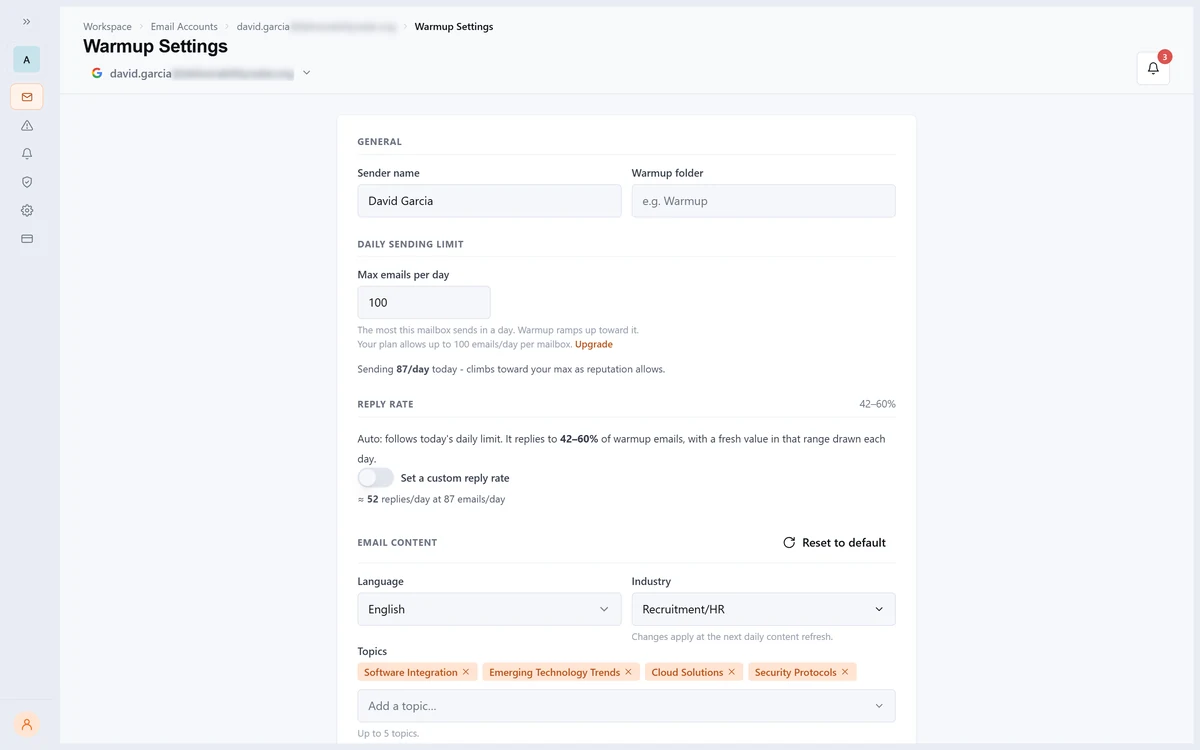
The AI does the rest: how fast it ramps, how much it sends today, and when to hold back. It reads that mailbox’s own results to decide.
The ramp fits the mailbox, instead of a setting you guessed at.
Once a mailbox is ready for outreach, warmup keeps running at a steady level in the background.
Interactions That Look Like Real Correspondence
Warmup emails that land in spam are moved back to the inbox, then opened, starred and replied to
That engagement tells Gmail and Outlook the sender is trusted.
V2 adds two more kinds of interaction.
- Warmup mail now runs as a conversation: a reply, an answer to that reply, a thread that builds over days, rather than a single message and a single response.
- A warmup email arriving at one of your mailboxes can be forwarded to another mailbox on the same domain, so the activity providers see includes mail moving between your own people, the way it does in a real company.
The ramp fits the mailbox, instead of a setting you guessed at.
Once a mailbox is ready for outreach, warmup keeps running at a steady level in the background.
What Hasn’t Changed!
Reply rate and provider mix work the way they always have.
Warmup replies to a share of the emails it sends, and you can still set how sending splits between Gmail, Outlook and everywhere else, or leave both on automatic.
Scheduling is the part that got better.
Send in business hours, extended hours, or hours you set yourself. Weight it to the morning or the afternoon.
Each mailbox runs on its own timezone.
Reputation Pools Decide Who Warms Up With Whom
Every mailbox gets a score each day.
It’s based on delivery rate, connection health, blacklist status, bounces, spam rate and the mailbox’s age.
That score puts the mailbox in one of three pools: A for top performers, B for established mailboxes, and C for new ones.
- A mailbox only sends warmup emails to its own pool and the pools below it.
- A brand-new mailbox never writes to a proven one. Strong mailboxes pass engagement down to the newcomers instead.
Mailboxes move up after a run of strong days. If a score slips, the mailbox drops back straight away.
Emails That Read Like Real Business Email
Warmup emails are written by AI to fit your industry, your topics and your language.
If you’d rather use your own copy, there are now Templates.
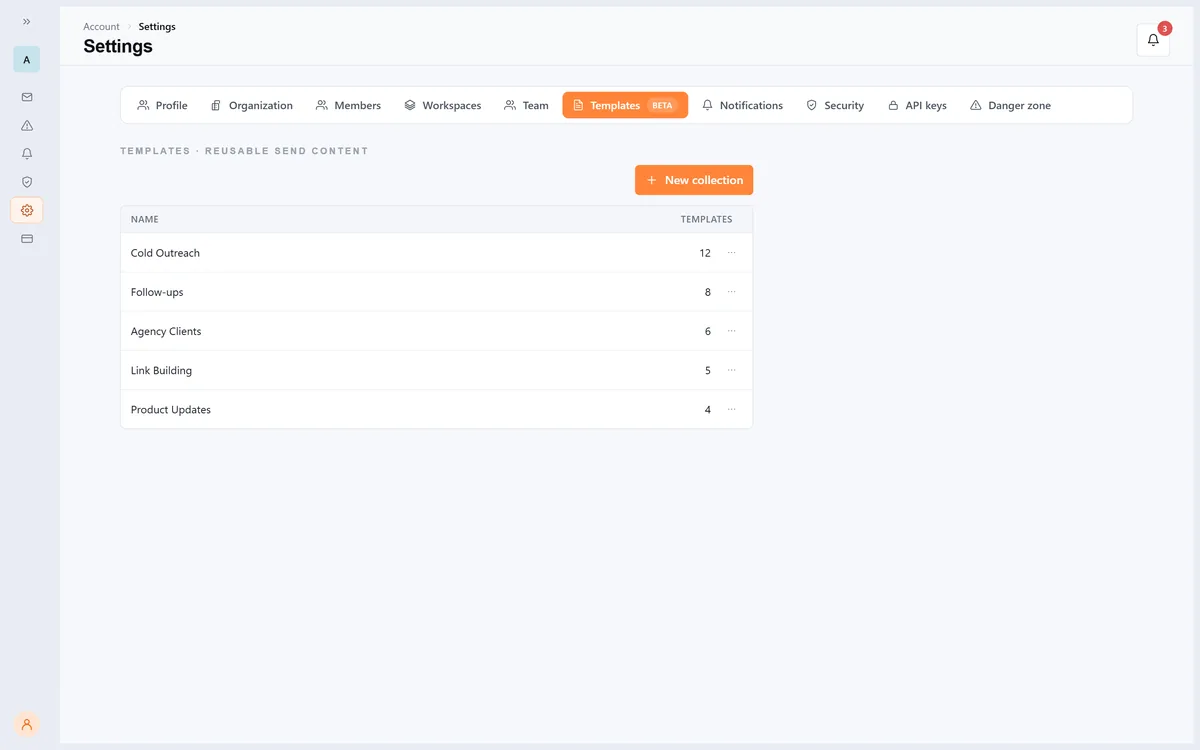
Templates is in beta on Growth and above, and opens up to every plan once it is fully built out.
Build collections of your own subject lines and email bodies.
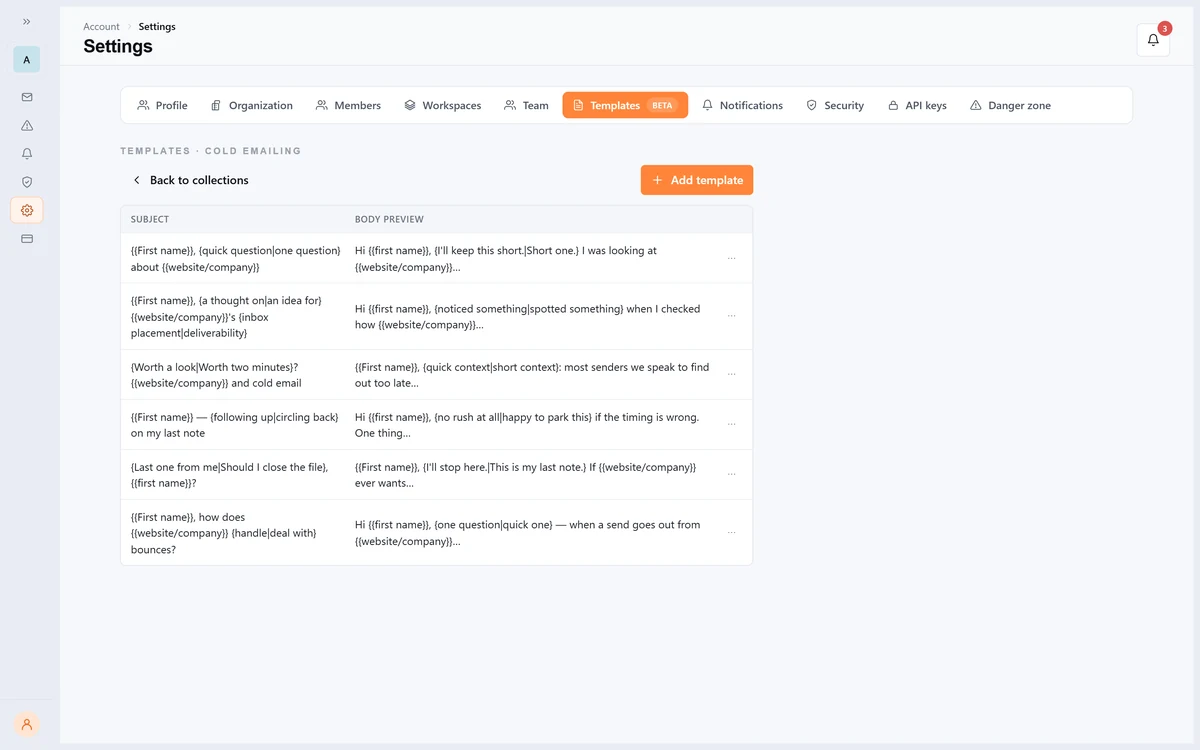
Assign them to one mailbox or many, then decide how much to mix with AI content, from all AI to all yours.
Continuous Reputation Monitoring
Two Scores: Deliverability and Reputation Score!
The deliverability score is unchanged.
It answers one question: of the warmup emails your mailbox sent, how many reached the inbox?
Send 100 and 96 land in the inbox, and the score is 96%.
The reputation score is new.
It’s a score out of 100, worked out from the last 15 days of that mailbox’s performance.
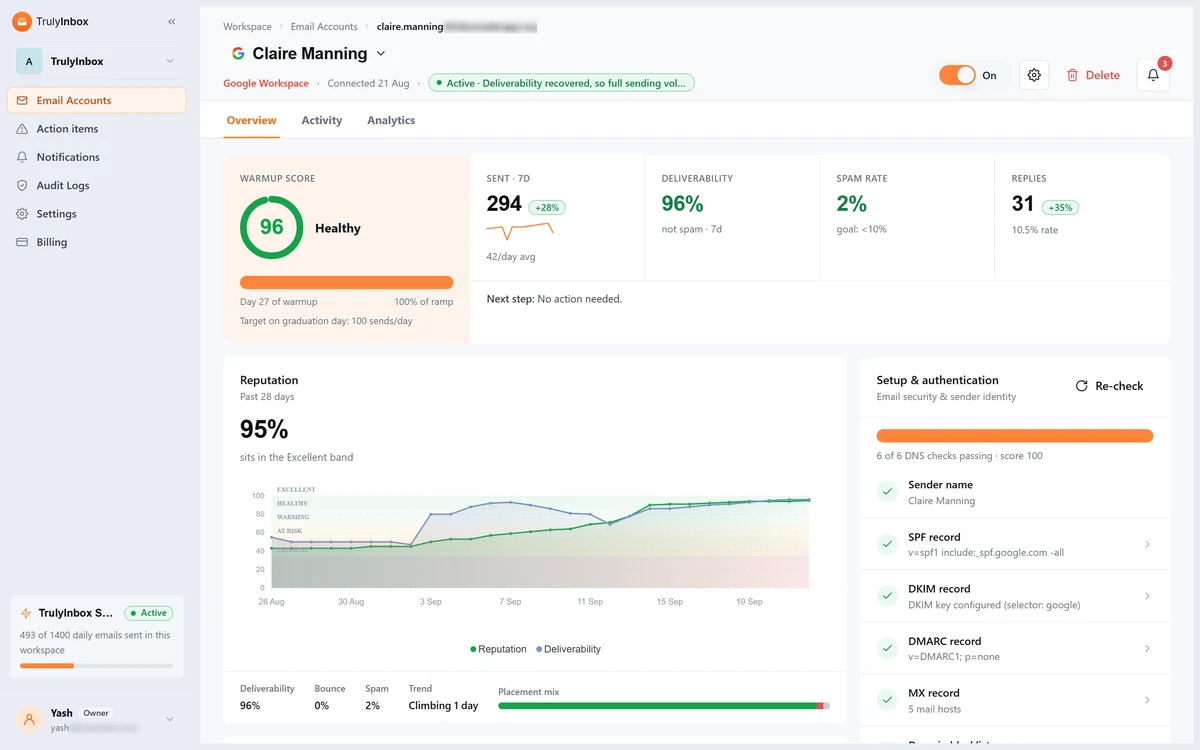
It weighs how much mail reached the inbox, how much went to spam, how much landed in other folders, how much bounced, and a few more signals besides.
One measures a send.
The other measures a mailbox over time. A mailbox can have a good day and still carry a poor reputation, which is exactly why we added the second number.
A 30-day chart shows where the reputation score sits across five bands, from Critical to Excellent.
Underneath, you’ll see your 7-day inbox, bounce and spam rates and which way the score is heading.
Checks That Don’t Wait for You
Six DNS checks run automatically, SPF, DKIM, DMARC and MX among them, and each one is explained in plain words.
Fix a record, hit Re-check DNS, and the change shows up straight away.
Your sending domain and IP are checked against 44 domain blacklists and 38 IP blacklists on a regular schedule.
If a list flags you, you’ll see exactly which one.
Know When a Mailbox Is Ready
Every mailbox carries a clear label: Ready, Warming or Not Ready.
A mailbox is Ready when warmup is done and deliverability over the last 15 days is 80% or higher.
It also needs no DNS problems and no suspensions.
You can see how each mailbox lands at Gmail, Outlook and other providers, side by side.
And you can export a warmup report for any time period.
Alerts and Action Items
A new notification centre flags things like paused warmup or a failed DNS check.
You decide which alerts you get, in the app, by email, or both.
Action Items is not new, but it is where most of the work went.
Anything that needs your attention is surfaced instead of waiting to be found, and every item carries the fix.
A DNS record that failed its check. A mailbox that disconnected.
Every one is listed, so you don’t have to dig through mailboxes to find the problem, and fixing it takes it off the list.
Re-Built for Teams And Agencies
Workspaces and Sending Budgets
Keep each client’s or brand’s mailboxes in their own workspace under one organisation, and switch between them in one click.
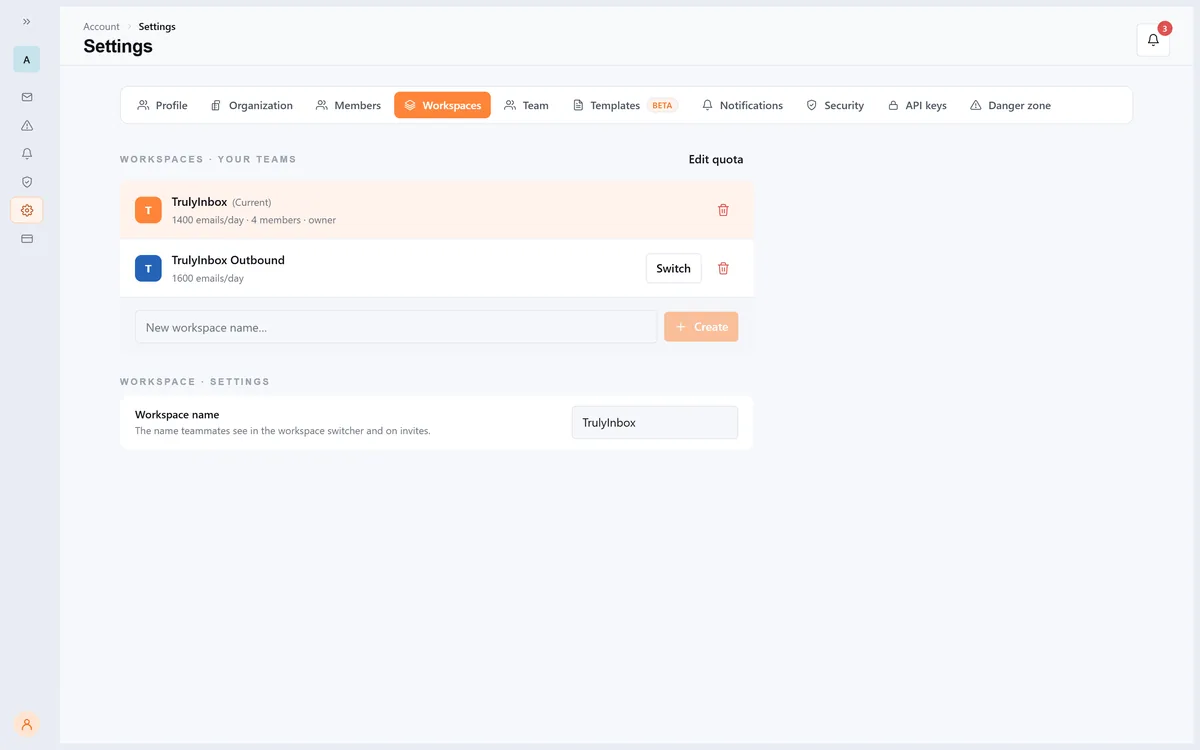
Your plan’s daily warmup volume splits across those workspaces too, so no single client can eat more than its share.
Team Invites, Roles and Audit Logs
For the first time you can bring your team in.
Invite people by email or a shareable link, and give each one a role: Owner, Admin, Editor or Viewer.
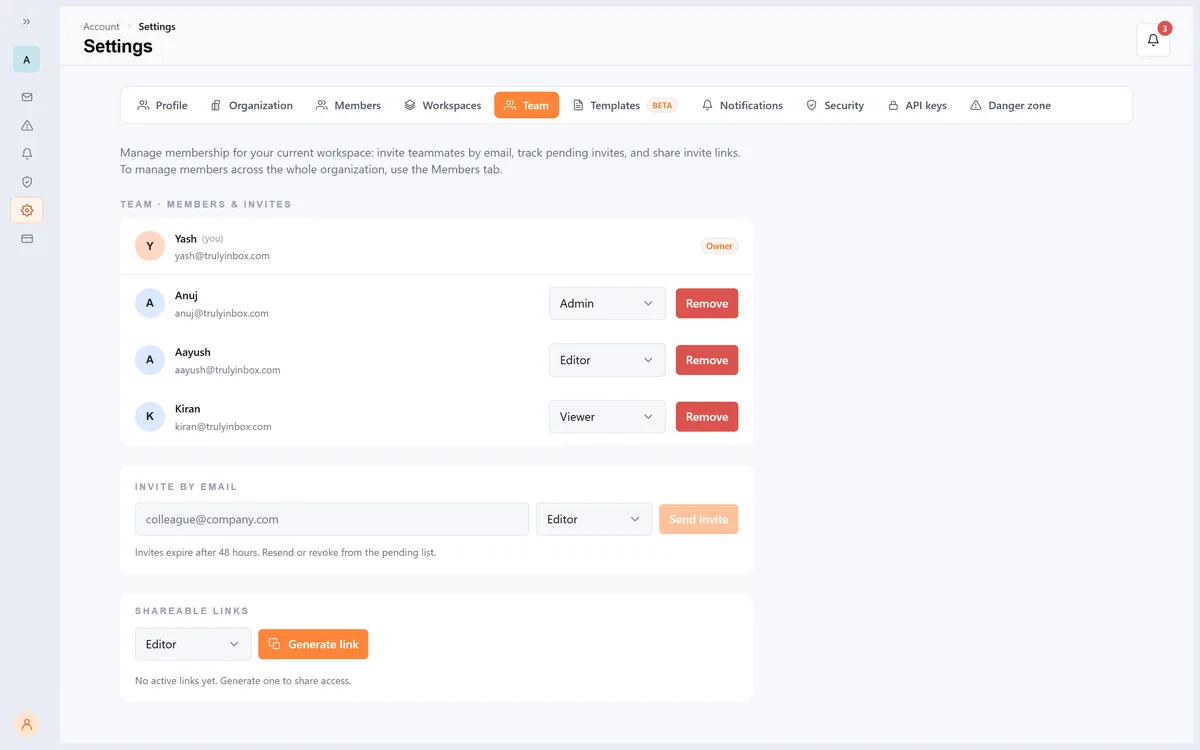
Owners and admins get an audit log of who changed what.
Partner Integration: White Labelled Warmup Solution For SaaS Outreach Platforms
Warmup can now run inside your product.
Outbound tools, email infrastructure providers and agencies can embed TrulyInbox warmup through our partner APIs.
Your customers connect Google Workspace and Microsoft 365 mailboxes with domain-wide delegation OAuth: one admin approval covers the mailboxes on that domain.
Warmup runs behind the scenes, and no passwords change hands.
If you run a sales engagement platform, a cold email tool, email infrastructure or an agency, we’d like to talk.
Talk to us about partner integration
A New App, Top to Bottom
We redesigned the whole app. Everything you use today is still here, bulk actions, filters, tags, custom columns.
It is faster, and it holds up when you are running hundreds of mailboxes.
A few smaller changes you’ll notice straight away:
- Sign in with a magic link, a one-time code, a password, Google or Microsoft
- See every device you’re signed in on, and sign out of all of them at once
- Set your language and timezone
- Dark mode, at last
Connecting mailboxes works the way you’d expect. One-click Google and Microsoft sign-in.
App passwords. Zoho, Yahoo, Amazon SES, SendGrid, Mailgun, or any other SMTP or IMAP provider.
CSV bulk upload and directory import.
Every connection is tested before it saves.
What’s Next? Upcoming Feeatures
TrulyInbox now shows you where every mailbox stands. Next, we’re making it tell you what to do about it, this quarter.
Inbox Placement Testing
You can already see how your warmup mail is landing.
What you cannot do yet is test a real campaign before you send it.
Inbox placement testing will let you check where a message actually arrives, inbox, promotions or spam, at the major providers, before it goes to your list.
Expected mid to late November.
Auto Email Provider Prioritization
Some mailboxes land in the inbox at Gmail but struggle at Outlook, or the other way round.
TrulyInbox already shows you that split. Next, TrulyInbox will tell you what to do about it.
Set a custom provider mix, and if the results start to split you’ll see a prompt on that mailbox.
It names the providers affected, shows the numbers behind it, and suggests a different mix. Click Apply and the new mix is saved.
- Nothing changes until you click Apply
- The new values show up in your settings, and you can edit them
- Your previous settings are kept, so you can switch back
We’re also building inbox placement testing, so you can see exactly which folder your emails land in.
That one is committed for this quarter.
Goals: Warmup Planned Around Your Campaign
Tell TrulyInbox how many cold emails a campaign needs to send, and assign the mailboxes that will send them. Goals turns that number into a plan:
- How many mailboxes and domains you need to hit it
- How many cold emails your mailboxes can safely send right now, based on how far their warmup has ramped
- The safe sending limit for each mailbox, and the warmup volume it needs alongside
- What to change in your setup to reach the goal
- A flag when a mailbox sends more, or starts sending earlier, than it’s ready for
No more guessing how hard you can push a mailbox.
What Happens to Your Account?
We’re rolling V2 out in stages from 2 October.
Free accounts move first, then each plan in turn.
API users move last. We’ll email you before your account moves.
What Changes and What Stays?
You don’t need to reconnect anything. We move your mailboxes over for you.
Your old warmup strategy is replaced by the new AI strategy automatically, so there’s nothing to choose.
Your warmup progress, your history and your warmup settings all carry over with your mailboxes, and warmup keeps running through the move.
If You Use the TrulyInbox API
Create personal or workspace API keys with limited permissions from Settings.
Endpoints change in V2, and we’re publishing a migration guide that lists exactly which calls to update.
API accounts move last, after the free accounts are through.
We’ll confirm dates once we’ve watched that first wave for a few days.
Frequently Asked Questions
1. Do I need to do anything when the new TrulyInbox arrives?
No. We move your mailboxes over for you, so there’s nothing to reconnect.
2. When will my account move to V2?
Rollout starts on 2 October. Free accounts go first, then each plan in turn, and API users last. We’ll email you before your account moves.
3. What happens to the warmup strategy I picked?
It’s replaced by the new AI strategy automatically. There’s nothing to choose or approve.
4. Does my warmup restart from zero?
No. Warmup keeps running through the move, and your warmup data moves with it.
5. Do my settings carry over?
Yes. Schedule, reply rate, provider mix and content topics all move across with the mailbox, along with your warmup progress and history.
6. Will anything pause during the move?
No. Warmup keeps running through the move, and there is nothing to reconnect.
7. How is my warmup reputation score worked out?
It is recalculated every day from your recent delivery results, your domain setup and your bounces. The 30-day chart shows which of the five bands you sit in, from Critical to Excellent, and which way the score is heading.
8. Will I still see my past warmup stats?
Yes. Your warmup history migrates with your mailboxes.
9. I use the TrulyInbox API. Do I need to change anything?
Yes. Endpoints change, so you’ll need to update your calls. We’re publishing a migration guide with the full list before API accounts move, and API accounts are last in the rollout.