

A PTR record, also called reverse DNS, maps your sending IP address back to a hostname. Receiving servers like Gmail check it before they decide whether to trust your mail.
Whether you need to do anything about it depends on how you send. On Google Workspace or Microsoft 365, you almost certainly don’t. On your own server or a VPS, you probably do.
This page covers four things: what a PTR record does, who sets one, how to check yours, and how to fix it.
What Is a PTR Record?
A PTR record, short for pointer record, is the reverse of an A record. An A record takes a hostname and gives you its IP. A PTR goes the other way: hand it an IP, it names the host.
These records live in a DNS zone called in-addr.arpa, and whoever owns the IP address block controls them, not whoever owns the domain.
Here’s the same mail server looked up both ways:
| Lookup | Record | Points to |
|---|---|---|
| Forward | A record for mail.yourdomain.com | 203.0.113.10 |
| Reverse | PTR record for 10.113.0.203.in-addr.arpa | mail.yourdomain.com |
The IP is written backwards in the reverse lookup, which is simply how the in-addr.arpa zone works.
When both directions agree, your reverse DNS is valid.
One fact drives the rest of this page: the PTR record is set by whoever owns the IP address block.
So if you don’t own your sending IP, you don’t set your own PTR record. Editing your domain’s DNS won’t create one. Whether that’s your job or your provider’s is the next question.
Why PTR Records Matter for Email
When your mail server opens a connection, the receiving server sees an IP address and little else. A reverse lookup on that IP is the cheapest check it has.
A real mail server has a PTR record pointing at a real hostname. A compromised home computer or a throwaway VPS usually doesn’t. That makes the record an early, crude trust signal.
It gets checked before anything looks at your message content.
The check receivers actually run is called forward-confirmed reverse DNS, or FCrDNS. It works in two steps:
- Look up the PTR record for the connecting IP. It returns a hostname.
- Take that hostname and look up its A record. It should return the IP you started from.
If both steps agree, the record round-trips and the check passes. It fails if the PTR points at a generic hostname your ISP assigned. It also fails if that hostname’s A record points somewhere else.
This is where most of the confusion starts, because three separate questions get treated as one:
- Does the PTR have to match your sending domain? No. A PTR pointing at
mail.yourprovider.comwhile you send asyou@yourdomain.comis normal. - Your HELO banner? Conventional, and it helps, but not an RFC requirement. Microsoft 365 deliberately doesn’t do it.
- Round trip back to the same IP? Yes. That’s the part Google actually requires.
Google states the requirement on its own Email sender guidelines page, and it applies to all senders, not only the high volume tier. Yahoo states the same on its sender best practices page.
Microsoft is the useful exception, because it publishes no general reverse DNS requirement for outbound senders. So when a guide tells you every major provider requires it, Microsoft is the one that never said so.
What a valid PTR won’t do is carry you on its own. It’s necessary, not sufficient.
Is Setting Up PTR Your Job?
Whoever owns the sending IP owns the PTR record. So whether this is your job comes down to who owns the IP your mail leaves from.
| How you send | Who owns the sending IP | Is PTR your job? | What to do |
|---|---|---|---|
| Google Workspace or Gmail | No | Nothing. Google sets a valid PTR on its outbound IPs. Confirm it from a sent message’s headers. | |
| Microsoft 365 or Outlook | Microsoft | No | Nothing. Confirm it the same way. |
| An ESP or SMTP relay on a shared IP | Your ESP | No, theirs | Check theirs. If it’s broken, that’s a support ticket, not a DNS change you can make. |
| A dedicated IP from an ESP or host | You, through the provider | Partly | Ask the provider to set the PTR, pointing it at a hostname you control. |
| A self-hosted server or your own IP block | You | Yes | Set the PTR yourself or through your ISP, matching your A record. |
Most cold outreach runs on Workspace or Microsoft 365 mailboxes, so for most senders the PTR is already handled.
Microsoft documents this directly: its outbound IPs already have forward-confirmed reverse DNS, and the HELO name deliberately doesn’t match the PTR. That mismatch isn’t a fault, and it isn’t yours to fix.
That matters because of what tools report. On a hosted setup, checkers often flag “no PTR record”, or “reverse DNS doesn’t match your sending domain”. Usually they’re reading your web host rather than your real sending path.
How to Check Your Sending IP’s PTR
Most guides open with a lookup command, which skips the hard part: knowing which IP to look up.
Step 1: Find the IP Your Mail Actually Leaves From
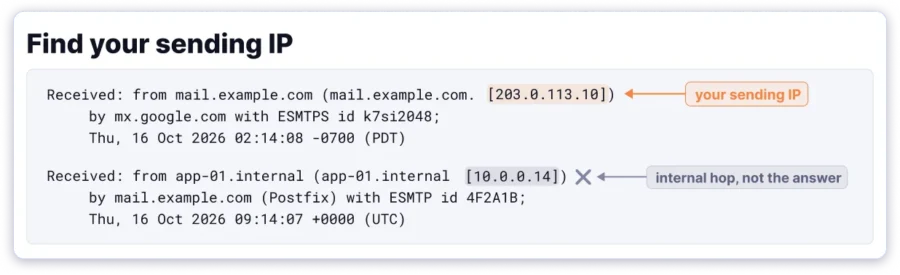
Send yourself a test email, then open the original message headers.
Read down the Received: chain to the lowest hop that belongs to your sender. That’s your sending IP, and it’s the only one whose PTR matters.
Not your website’s IP, and not your domain’s A record.
Check the version while you’re there. If that IP has colons in it, your mail went out over IPv6, and the v6 address is the one to look up.
Skip the raw text. Paste a message into our free email header analyzer and it will pull out the sending IP for you.
Step 2: Look Up the PTR on That IP
On Mac or Linux, run dig -x 203.0.113.10 +short. On Windows, run nslookup 203.0.113.10.
A healthy record returns a hostname, while a missing one returns NXDOMAIN or no answer at all.
Step 3: Confirm the Round Trip
Look up the A record for the hostname you just got back, and check it returns the IP you started with.
If it returns a different IP, the PTR exists but the FCrDNS check still fails. That’s the case people most often miss.
If headers aren’t your thing, a reverse lookup tool such as MXToolbox will do steps 2 and 3 from an IP address.
What a Missing or Mismatched PTR Looks Like (the 550 5.7.25 Error)
A broken PTR shows up two ways. The quiet one is filtering. Your mail is accepted, lands in spam, and no bounce tells you why.
The loud one is a rejection at connection time. Gmail’s permanent response is 550 5.7.25, and a real bounce arrives looking like this:
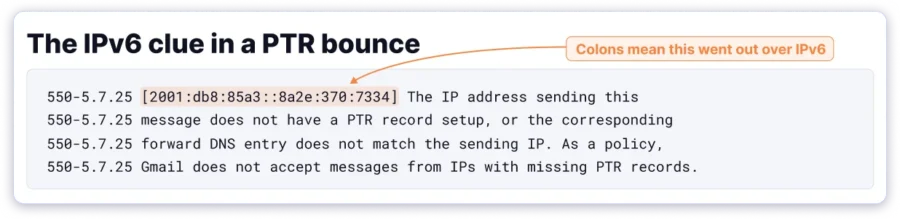
That’s an observed bounce rather than documentation. Google’s SMTP error code reference words the same code differently.
Real bounces vary too, between “does not match” and “does not point to”, so don’t expect yours to read like anyone else’s.
One sibling code is worth knowing. 451 4.7.23 is the temporary twin of 5.7.25, with the same PTR cause. Your mail is rate limited instead of rejected outright.
One lookalike is worth ignoring. 421 4.7.0 gets blamed on PTR constantly. Google documents that code seven different ways on a single page, and only one of them mentions PTR.
In practice it’s nearly always rate limiting or suspicious content. Google renumbered the rate-limit version to 421 4.7.28 back in 2019. Both numbers still show up.
With a 421, read the message text and not the number.
A real 5.7.25 is telling you one of two things. No PTR exists on your sending IP, or one exists but doesn’t round-trip to it. The first is a missing record, the second an FCrDNS failure.
The most common version of this is an IPv6 problem. Your server has a valid PTR on its IPv4 address. Every tool you try agrees, and Gmail keeps rejecting you anyway.
That happens because the server is sending over IPv6, and the IPv6 address has no PTR of its own. The tools weren’t wrong. They were answering about a different address.
Your bounce gives it away. Gmail prints the connecting IP in square brackets, and colons in that address mean the message left over IPv6.
One Gmail Community thread on this exact problem has 270 people saying they have it too, with no clear fix in it.
Timing matters here too. Spam Resource reported in December 2025 that Gmail had stepped up enforcement, so senders who were fine for years can suddenly start seeing this.
Since 5.7.25 is a sub-code of 550, it’s worth knowing how 550 permanent failure errors work in general.
There’s one more thing about that code, and almost nobody mentions it. Gmail uses 550 5.7.25 for a missing or non-matching PTR on either IP version.
Microsoft uses the same code for something narrower. Its mail flow documentation ties the reverse DNS requirement to inbound IPv6, not to outbound senders in general.
So read the bouncing server’s name before you act on the number, because the same five digits send you down two different paths.
Microsoft has a PTR bounce of its own worth recognising. If yours says Action Required: Misconfigured PTR record with the code 550 5.7.363, that’s a receiving server turning you away rather than Microsoft.
On a hosted Microsoft 365 tenant there’s nothing in your own DNS to fix. The PTR belongs to Microsoft. Take it up with the receiving side, or open a ticket with the bounce text.
How to Fix a PTR Record
The fix depends on who owns the IP, so find your row in the table above first.
- On Workspace, Microsoft 365 or a shared ESP IP: you don’t fix this. A genuine
5.7.25from your real sending IP is the provider’s. Open a ticket with the IP and the bounce text. - On a dedicated IP: ask the ESP or host to set the PTR for you. Give them the IP and the hostname you want it to resolve to, such as
mail.yourdomain.com.
Then create the matching A record for that hostname, so the round trip passes.
- Self-hosted: set the PTR wherever the IP block is controlled, usually your ISP or cloud provider. Point it at your mail hostname and match the A record.
Use that same hostname in your server’s HELO greeting, so all three agree.
Two practical notes. The forward A record usually has to exist before the IP owner will set the PTR. That’s how they verify the hostname is yours.
And expect a ticket rather than a form. First-line support often doesn’t know the term, so quote the bounce and name the IP.
Check IPv6 before anything else. A server with both addresses will often prefer IPv6, and your IPv4 PTR does nothing for those sends.
Set a PTR on the IPv6 address and an AAAA record for the hostname, just as you did for v4. Then confirm both directions resolve.
Switching IPv6 off in your mail server also stops the bounces, and plenty of people do exactly that. It’s a stopgap rather than a fix. Set the record if you can.
Allow time for DNS to propagate, then re-run the three-step check above to confirm.
Then do the rest. With the PTR settled, set up SPF, DKIM and DMARC if you haven’t, then run the deliverability checklist.
Where PTR Sits Next to SPF, DKIM and DMARC
SPF, DKIM and DMARC authenticate the message and the domain. A PTR record authenticates the connecting IP. They answer different questions, and bulk sender rules now expect all of them.
| Record | What it checks | Who sets it |
|---|---|---|
| PTR (reverse DNS) | The sending IP maps to a real hostname that maps back | Whoever owns the IP |
| SPF | The IP is allowed to send for your domain | The domain owner |
| DKIM | The message was signed by your domain and not altered | The domain owner |
| DMARC | What receivers do when SPF or DKIM fail, plus reporting | The domain owner |
The last column is the useful one. Three of these are yours to set, and the one at the top usually isn’t.
Working through the stack? The no DMARC record found error and what an MX record does cover the two gaps we see most.
What a Valid PTR Record Will Not Do
A valid PTR gets you past the front-door check. It doesn’t make you a trusted sender.
Placement still depends on your sender reputation and how people engage with your mail. List quality counts, and so does whether your domains and mailboxes are warmed. That last part matters most for cold outreach on new sending infrastructure.
So the order is simple. Fix the PTR once, or confirm your provider already has, then spend your effort on what moves placement day to day.
Frequently Asked Questions
Do I Need a PTR Record?
Your sending IP does, but setting it up may not be your job. On Workspace, Microsoft 365 or a shared ESP IP, the provider handles it. On a dedicated IP or your own server, it’s yours.
What Should My PTR Record Be?
A hostname you control that resolves back to the same sending IP, such as mail.yourdomain.com. Create the matching A record too, or the round-trip check fails.
How Do I Find My PTR Record?
Find your sending IP in a sent message’s headers, then run dig -x <ip> +short on Mac or Linux, or nslookup <ip> on Windows.
What Is the Difference Between a PTR Record and an A Record?
An A record points a hostname at an IP address. A PTR goes the other way, naming the host that owns an IP. Both have to agree for forward-confirmed reverse DNS to pass.
What Is the 550 5.7.25 Error?
From Gmail, the sending IP has no PTR record or its forward DNS doesn’t match. The commonest cause is an IPv6 send with no IPv6 PTR. Microsoft uses the same code for an IPv6 condition of its own.
Does Google Workspace Need a PTR Record?
No action is needed from you. Google sets a valid PTR on its own sending IPs, which you can confirm from the headers of a message you’ve sent.